
Grounded PS5 Release Date, Time

Grounded had a slow start in its initial release on Xbox consoles and PC, but now has a very stable playerbase on both platforms. Unsurprisingly, Grounded, by developers Obsidian Entertainment, is among four games that have been selected by Microsoft to end their platform exclusivity, with the announcement of its impending release on rival Sony’s PlayStation 5 console.

Here’s what we’ve got on the release date and time for Grounded on PS5.

UPDATED April 15


Sea Of Thieves PS5 Release Date And Time


Grounded PS5 Release Date And Time

Grounded on PS5
Grounded on PS5

Grounded is scheduled for release on April 16, 2024 for PlayStation 5. 

No demo is available for the game, nor has any announcement been made regarding its potential inclusion in PlayStation Plus cloud streaming services.

The game will unlock concurrently globally, at midnight 11 AM ET. Here are localized times for major regions:

8 AM Pacific Time (PT) April 16

9 AM Mountain Time (MT) April 16

10 AM Central Time (CT) April 16

11 AM Eastern Time (ET) April 16

3 PM Universal Coordinated Time (UTC)/Greenwich Mean Time (GMT) April 16

4 PM British Summer Time (BST) April 16

5 PM Central European Summer Time (CEST) April 16

8:30 PM Indian Standard Time (IST) April 16

11 PM Singapore/Taiwan/Hong Kong Time April 16

12 AM South Korea Standard Time (KST) April 17

12 AM Japan Standard Time (JST) April 17

Pre-ordering and wishlisting have been open on the PlayStation Store for a while now.

Here’s the direct link to the US PlayStation Store, which should automatically re-direct you if you are in another region:

https://store.playstation.com/en-us/concept/10008048


MORE IN PLAYSTATION GAMES:


Grounded PS4 Release Date And Time

Grounded on PlayStation 5

PlayStation 4 players will rejoice that Grounded will also be available on Apr 16, 2024 for PS4, unlike two other upcoming former exclusives: Hi-Fi Rush, and Sea of Thieves. While the exclusion of the latter two is slightly infuriating, all things considered, PS4 holdouts should take every piece of good news they can get as the aging console reaches the end of its life cycle.


https://hard-drive.net/guides/stellar-blade-release-date-time/


Grounded is one of the best co-op game experiences around, and now both PS4 and PS5 players can partake in that as well.
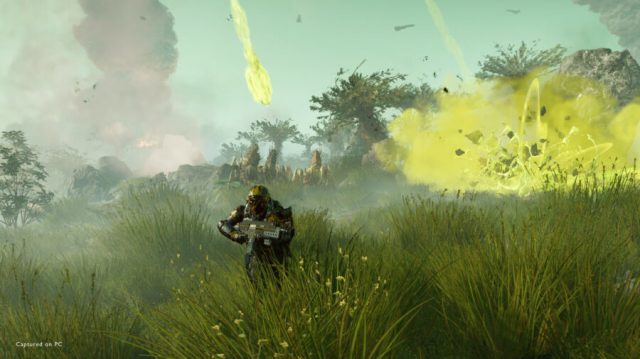
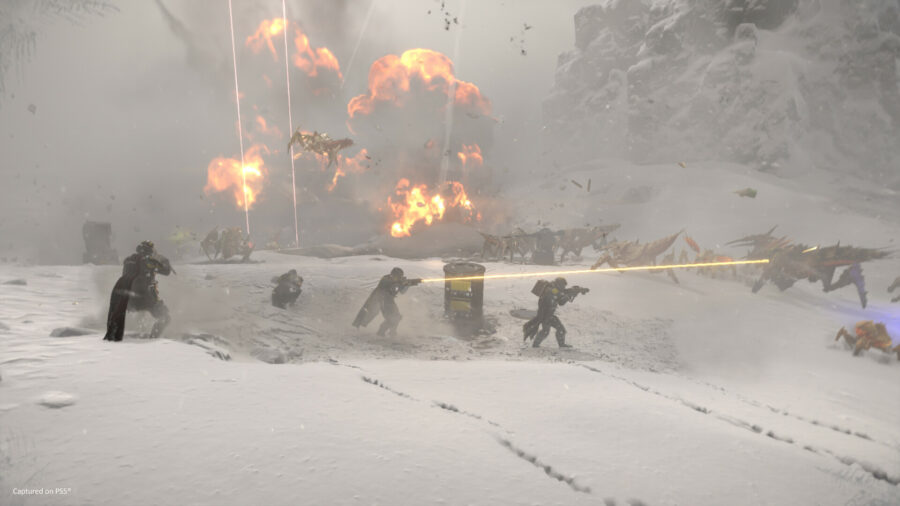
Helldivers 2 Farm Free Super Credits

Super Credits are one of three distinct currencies in Helldivers 2. They are the monetization currency in the game, intended for keeping the developers in business while they continue updating the game, and are usually bought with real world money. The Super Credits can then be spent on Armor from the Super Store, as well as the Premium Warbonds, which are effectively mini Battle Passes in Helldivers 2. Even so, these Super Credits can still be earned in-game for free with a little bit of farming and grinding. Find out how to farm Super Credits for free in this Helldivers 2 guide.

UPDATED April 16


Helldivers 2 Update Patch Notes 01.000.203 Apr 16


Helldivers 2 Free Super Credits Farming

Ideally you will undertake missions on Trivial, so that you can breeze through the objectives quickly while focusing on exploring the map for farming both Super Credits and whatever else you want. Places of Interest will not be guarded by enemies, and everything will just chug along smoother. It is also believed that Trivial difficulty makes the map more condensed, with Places of Interest positioned closer to each other, and eliminating some of the emptiness between areas. Lastly, the loot table will be less populated with the various Samples.

With mission selection, opt for anything at all, but preferably nothing involving swarms or waves. Again, you want to wrap up the primary objective quickly and move on to more important things. Desert maps are ideal for being relatively flat and uncluttered, allowing for fast map traversal and identification of Places of Interest. However, the Intense Heat status effect or debuff can tax your stamina, so it’s a bit of a balancing act.


MORE IN HELLDIVERS 2:


Next, the premium currency nature of the Super Credits also means that once you collect them, they are immediately added to your account itself. Which means that you don’t even need to properly extract from the mission to accrue them. If you haven’t picked up anything of note besides Super Credits, or are just farmed out on everything else, or simply have a hard focus on Super Credits, then you can just abandon the mission. You will still have your collected Super Credits, as well as any Medals, in your possession. This will save you the precious time involving extraction screens, reward screens, and whatever else, all of which can be quite lengthy.

Abandoning the mission will lose Requisition Slips, Samples, and any experience gained, or everything listed in the counters at the top-right of the screen. Only do this on planets with zero, or a very low liberation rating, so as not to set back the progress of other players trying to achieve freedom with their precious victory points.


Helldivers 2 Best Stratagems For Super Credits Farming

As far as Stratagems and loadout goes, opt for light armors, extra impact grenades, and bring the Lift-850 Jump Pack. This will allow you to traverse the map quickly between Places of Interest, and afford you the ability to blow open containers for the loot inside.

In the event that you have no grenades to deploy, make use of any available explosive red barrels to get the job done, by positioning them and shooting.

The Autocannon Stratagem is even better, if you have it unlocked.


Helldivers 2 Find Places Of Interest

You can ignore most of the side objectives, but if you get the radar tower, finding and completing it will mark all the Places of Interest on your map with a diamond symbol indicating pickups at those locations. As you cycle through those points and clear them all, a new symbol will appear for the next set of pickups.

Without the radar tower, you can also simply zoom in on your map, and try to identify geometrical outlines amidst the natural topography. These are structures and facilities, Places of Interest where you are most likely to find caches of pickups like Medals and Super Credits.

Another tip is if you just tap the silhouette of something on the map that looks like it might be a Place of Interest, you can get instant feedback because it will be highlighted automatically. You could also spam tap randomly around the map until you hit pay dirt.

If you’re in physical proximity to something interesting it will appear on your compass at the top of the screen as a question mark. Once the Place of Interest has been found, the question mark will disappear.


Helldivers 2 Co-op Super Credits Farming

Ideally you would run these farming missions in a team to maximize your potential while not being bored out of your gourd. Breeze through the objectives, and then fan out in different directions in search of facilities to ping for the group. Having at least one buddy along would also help with opening the double doors of bunkers, which can often be a trove of pickups, and with Super Credits specifically, as many as three per point.

Every player receives Medals and Super Credits, regardless of which player actually picked it up. It is not a shared pool that is distributed evenly between squad mates, rather each and every member receives the sum total of Medals and Super Credits picked up.

The above is true even if the mission is failed, at which point the only pickups lost are Samples, which must be extracted.


Here’s the Review We Would Write if We Could Play Helldivers 2


That’s everything you can do to farm Super Credits for free in Helldivers 2.

Helldivers 2 Login Limit Reached Error Fixes

A persistent login issue with Helldivers 2 might be preventing players from proceeding past the splash screen. The particular error we’ll be dealing with in this guide is about “Login limit reached. Please wait to be let in” and fixes for the issue.

UPDATED April 16


Helldivers 2 Update Patch Notes 01.000.203 Apr 16


Helldivers 2 Login Limit Reached Fixes

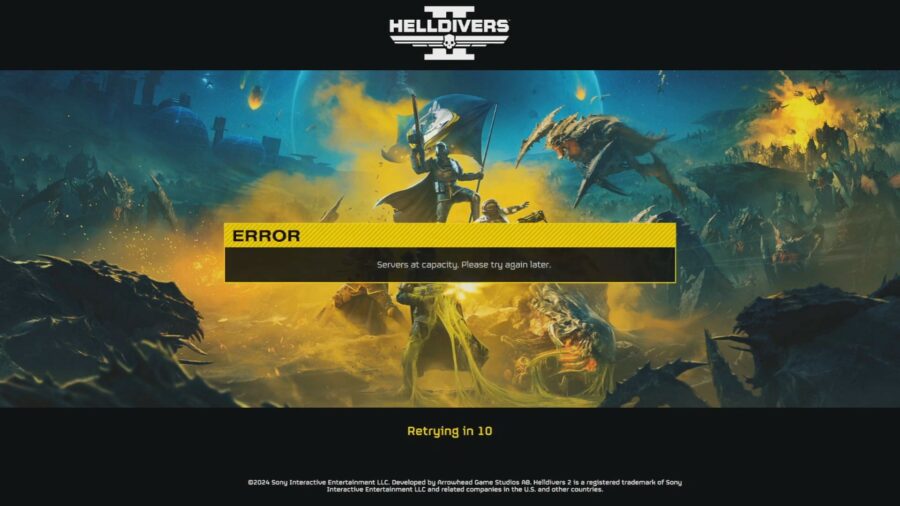
Helldivers 2 Servers at capacity. Please try again later.
Helldivers 2 “Servers at capacity. Please try again later.” error

The primary reason for the issue should be pretty obvious: there are too many active players currently attempting to log-in to a game with a grossly underestimated player log-in cap. Despite raising the concurrent player capacity twice from 250K to 360K, and then 450K, the problems persist as the game grows in popularity. There is also apparently a limit to how many players can login each minute, and that was also raised from the initial 10K to the current 20K. “Login limit reached. Please wait to be let in” is most likely due to the latter limitation given that particular phrasing. The former usually displays the message “Servers at capacity. Please try again later.”


Retry Login

The simplest thing you can do is to hammer the login attempt in the hope that a player elsewhere has finally given up on connecting to the game for the day, and then try to queue again for that vacated slot. But you’ve probably done that already, or you wouldn’t be reading this guide, so on with other actual known fixes.


MORE IN HELLDIVERS 2:


Watch The Entire Intro Cutscene

For some reason, players are reporting that watching the entirety of the intro video has consistently avoided connectivity issues. This is possibly because the game will have adequate time to establish server communications in the background.


Disable CrossPlay Functionality

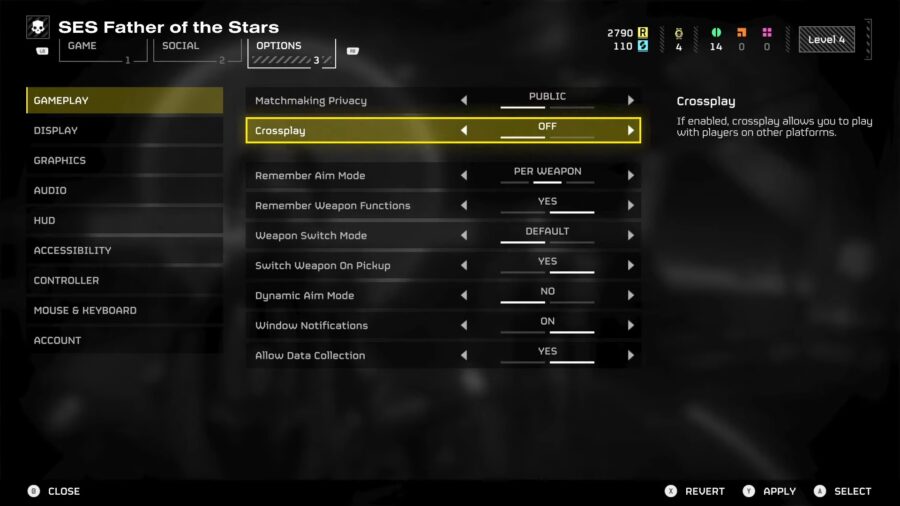
Helldivers 2 Crossplay Toggle

PlayStation 5 players have a fix all their own, by simply turning off crossplay. Ostensibly, this might be because server slots are reserved for players that want to be controller or platform purists. The setting is buried in Settings -> Options -> Gameplay -> Off. This might work for Steam players as well, assuming that slot reservation for mouse and keyboard purists has been implemented by the developers.


Join On Friends Online

This one might have to do with queue slots having social priority of some sort. Joining on an already connected Friend via the “Join Game” function seems to work more often than not, to at least get you into a session, if not necessarily with the settings that you prefer. This one will be difficult for players without active friends online, though looking-for-group (LFG) services on Reddit and Discord might help.


Comment
byu/Venomouspain- from discussion
inHelldivers


Comment
byu/chungusbuster666 from discussion
inHelldivers


Verify Game Files

A corrupted installation is said to be the cause of the issue for some players on both PlayStation 5 and Steam PC. You may want to either perform a fresh install, or simply use the “Verify integrity of game files” function by right-clicking Helldivers 2 -> Properties -> Installed Files. Here’s a detailed guide to verifying game file integrity from Steam itself.


Disable VPN

Players with VPNs may want to skip the middleman for once, as it is known to trip up server connectivity in Helldivers 2. If the VPN is vital to your online security, try switching to another city or country.


Disable IPv6

A more technical fix than most of us would like, nonetheless it has had success for many players as a last resort. According to multiple redditors, disabling IPv6, and falling back on IPv4 works 100% of the time for instances where no other solution worked. The post below has a perfect step by step guide to resolving the issue.


Comment
byu/xElectro from discussion
inHelldivers


Change DNS Server

DNS servers perform IP lookups, and your default DNS server may not be all that reliable, especially if it is offered by your internet service provider. You can try Cloudflare’s DNS services with 1.1.1.1 and 1.0.0.1

Here are several more DNS server options to choose from.


If all else fails, simply wait it out until the developers get around to fixing this issue, which they have consistently done over the past weeks.


Sony Promises Helldivers 3 Will Debut With at Least Two, Possibly Three Servers


That’s just about everything you can do to resolve “Login limit reached. Please wait to be let in” in Helldivers 2.

Helldivers 2 Farm Medals

Helldivers 2 has three currencies and three resources for players to juggle, all of which have utility in the game one way or another. One of those currencies are Warbond Medals, which are critical for unlocking the various standard Warbonds. Medals are fairly difficult to come by, especially considering how many of them it takes to actually unlock a given Warbond. This Helldivers 2 guide is intending for farming Medals as quickly as possible without being too much of a grind.

UPDATED April 16


Helldivers 2 Update Patch Notes 01.000.203 Apr 16


Helldivers 2 Medal Farming

Aside from completing your Personal Order of the day and claiming its rewards, several mission types are especially suited for farming Medals. While the post-extraction mission reward of Medals are great to have as a bonus, you’ll want to set the mission difficulty as low as you can manage easily, even Trivial if need be. Yes, the lower the better. This is because all six pickups share the same loot table, and you will want to maximize your potential for farming Medals from Places of Interest in the mission area itself. You will find between one and four per location, and as many as a dozen per mission, over and above whatever Medals you will accrue from mission completion.


MORE IN HELLDIVERS 2:


As for the type of missions, Destroy and Eradicate types are ideal as you can just quickly cut a swathe through enemies while focusing on exploration and pickup discovery. You can ignore most of the side objectives, but if you get the radar tower, finding and completing it will mark all the Places of Interest on your map with a diamond symbol indicating pickups at those locations. As you cycle through those points and clear them all, a new symbol will appear for the next set of pickups.

Without the radar tower, you can also simply zoom in on your map, and try to identify geometrical shapes amidst the natural topography. These are structures and facilities, Places of Interest where you are most likely to find caches of pickups like Medals and Super Credits.

Another tip is if you just tap the silhouette of something on the map that looks like it might be a Place of Interest, you can get instant feedback because it will be highlighted automatically. You could also spam tap randomly around the map until you hit pay dirt.


Helldivers 2 Best Stratagems For Medal Farming

In terms of best Stratagems for farming Medals, you really want something to ease map traversal as much as possible, so definitely get the Lift-850 Jump Pack. It will make crossing the vast expanses of nothingness between Places of Interest a lot faster, and mitigate boredom.

As for loadout, bring impact grenades to blow open containers, and the lightest armor possible, so as not to drain your stamina. Armor with more grenade slots would also be invaluable. The Autocannon Stratagem can come in handy for blowing things open as well, if you have it unlocked.


Helldivers 2 Co-op Medal Farming

Ideally you would run these farming missions in a team to maximize your potential while not being bored out of your gourd. Breeze through the objectives, and then fan out in different directions in search of facilities to ping for the group. Every player receives Medals and Super Credits, regardless of which player actually picked it up. It is not a shared pool that is distributed evenly between squad mates, rather each and every member receives the sum total of Medal and Super Credits pickups.

The above is true even if the mission is failed, at which point the only pickups lost are Samples, which must be extracted.

Having at least one buddy along would also help with opening the double doors of bunkers, which can often be a trove of pickups.


Here’s the Review We Would Write if We Could Play Helldivers 2


That’s everything there is to know about Medal farming in Helldivers 2.

Helldivers 2 Servers At Capacity Error Fix

Helldivers 2 is a surprise smash hit out of left field, and with its unexpected popularity comes player congestion and a host of unexpected technical issues. Maintaining a connection to servers being one of the biggest issues, the particular error we’ll be dealing with in this guide is about “Servers at capacity. Please try again later” and fixes for the issue.

UPDATED April 16


Helldivers 2 Update Patch Notes 01.000.203 Apr 16


Helldivers 2 Servers At Capacity Fixes

Helldivers 2 Servers at capacity. Please try again later.
Helldivers 2 “Servers at capacity. Please try again later.” error

The primary reason for the issue should be pretty obvious: there are too many active players currently logged-in to a game with a grossly underestimated player cap. Despite raising the concurrent player count twice from 250K to 360K, and then 450K, the problem persists as the game grows in popularity. There is also apparently a limit to how many players can login each minute, and that was raised from the initial 10K to the current 20K. “Servers at capacity. Please try again later” is most likely due to the former given limitation that particular choice of words. The latter usually displays the message “Login limit reached. Please wait to be let in.”


Retry Login

The simplest thing you can do is wait a minute or more in the hope that a player somewhere has finally finished their play session for the day, and then try to queue again for that vacated slot. But you’ve probably done that already, or you wouldn’t be reading this guide, so on with other actual known fixes.


MORE IN HELLDIVERS 2:


Watch The Entire Intro Cutscene

For some reason, players are reporting that watching the entirety of the intro video has consistently avoided connectivity issues. This is possibly because the game will have adequate time to establish server communications in the background.


Disable CrossPlay Functionality

Helldivers 2 Crossplay Toggle

PlayStation 5 players have a fix all their own, by simply turning off crossplay. Ostensibly, this might be because server slots are reserved for players that want to be controller or platform purists. The setting is buried in Settings -> Options -> Gameplay -> Off. This might work for Steam players as well, assuming that slot reservation for mouse and keyboard purists has been implemented by the developers.


Join On Friends Online

This one might have to do with queue slots having social priority of some sort. Joining on an already connected Friend via the “Join Game” function seems to work more often than not, to at least get you into a session, if not necessarily with the settings that you prefer. This one will be difficult for players without active friends online, though looking-for-group (LFG) services on Reddit and Discord might help.


Comment
byu/Venomouspain- from discussion
inHelldivers


Comment
byu/chungusbuster666 from discussion
inHelldivers


Verify Game Files

A corrupted installation is said to be the cause of the issue for some players on both PlayStation 5 and Steam PC. You may want to either perform a fresh install, or simply use the “Verify integrity of game files” function by right-clicking Helldivers 2 -> Properties -> Installed Files. Here’s a detailed guide to verifying game file integrity from Steam itself.


Disable VPN

Players with VPNs may want to skip the middleman for once, as it is known to trip up server connectivity in Helldivers 2. If the VPN is vital to your online security, try switching to another city or country.


Disable IPv6

A more technical fix than most of us would like, nonetheless it has had success for many players as a last resort. According to multiple redditors, disabling IPv6, and falling back on IPv4 works 100% of the time for instances where no other solution worked. The post below has a perfect step by step guide to resolving the issue.


Comment
byu/xElectro from discussion
inHelldivers


Change DNS Server

DNS servers perform IP lookups, and your default DNS server may not be all that reliable, especially if it is offered by your internet service provider. You can try Cloudflare’s DNS services with 1.1.1.1 and 1.0.0.1

Here are several more DNS server options to choose from.


If all else fails, simply wait it out until the developers get around to fixing this issue, which they have consistently done over the past weeks.


Sony Promises Helldivers 3 Will Debut With at Least Two, Possibly Three Servers


That’s just about everything you can do to resolve “Servers at capacity. Please try again later” in Helldivers 2.

Helldivers 2 Defrosting Helldiver Error Fixes

Helldivers 2 continues to suffer from all kinds of login errors preventing players from even loading into the game for the first time. This particular guide is intended for addressing the “Defrosting Helldiver” issue that persists on the loading screen on launching Helldivers 2.

UPDATED April 16


Helldivers 2 Update Patch Notes 01.000.203 Apr 16


Helldivers 2 Defrosting Helldiver Loading Screen

Helldivers 2 Defrosting Helldiver
Helldivers 2 Defrosting Helldiver error

The “Defrosting Helldiver” infinite loading screen is generally unlikely to be a server-side issue, since similar server related issues usually begin after the game has fully loaded-in locally on your machine. There are instances where the error eventually clears up but then leads to actual server errors such as “Servers at capacity. Please try again later” or “Login limit reached. Please wait to be let in”.

Instead, you will want to focus on verifying the integrity of your local game files, among other fixes.


MORE IN HELLDIVERS 2:


Reboot Your Device

Whether on PlayStation 5 or PC, try the simplest fix first: restart your machine and get a fresh start. If there are any  local network connectivity issues, this should resolve them as well. Failing that, you can proceed on to more advanced measures.


Watch The Entire Intro Cutscene

For some reason, players are reporting that watching the entirety of the intro video has consistently avoided connectivity issues. This is possibly because the game will have adequate time to establish server communications in the background.


Comment
byu/chungusbuster666 from discussion
inHelldivers


Verify Game Files

That most common fix for games that are experiencing technical issues. A corrupted installation is said to be the cause of the issue for some players on both PlayStation 5 and Steam PC. You may want to either perform a fresh install, or simply use the “Verify integrity of game files” function by right-clicking Helldivers 2 -> Properties -> Installed Files. Here’s a detailed guide to verifying game file integrity from Steam itself.

As an added aside, always make sure the game is updated. Since Helldivers 2 is an online-only, Games-as-a-Service (GaaS) title, if your game version isn’t synced with the server, you will not be able to login properly.


Join On Friends Online

This one might have to do with queue slots having social priority of some sort. Joining on an already connected Friend via the “Join Game” function seems to work more often than not, to at least get you into a session, if not necessarily with the settings that you prefer. This one will be difficult for players without active friends online, though looking-for-group (LFG) services on Reddit and Discord might help.


Comment
byu/Venomouspain- from discussion
inHelldivers


Comment
byu/chungusbuster666 from discussion
inHelldivers


Disable IPv6

A more technical fix than most of us would like, nonetheless it has had success for many players as a last resort. According to multiple redditors, disabling IPv6, and falling back on IPv4 works 100% of the time for instances where no other solution worked.


Comment
byu/DaD_main from discussion
inHelldivers


The post below has a perfect step by step guide to resolving the issue.


If all else fails, simply wait it out until the developers get around to fixing this issue, which they have consistently done over the past weeks.


Sony Promises Helldivers 3 Will Debut With at Least Two, Possibly Three Servers


That’s every known fix for the “Defrosting Helldiver” on launch error in Helldivers 2.

Helldivers 2 Can’t Log In

Having a bit of trouble logging-in to Helldivers 2 today? Yeah, so are a lot of players. Over the past four odd weeks, server connectivity issues have ebbed and flowed, but a myriad of solutions have also been found. This guide is a compilation of everything we know about fixing log-in problems in Helldivers 2.

UPDATED April 16


Helldivers 2 Update Patch Notes 01.000.203 Apr 16


Helldivers 2 Discord Announcement

Hello helldivers! We're aware of widespread login issues and are on it like Donkey Kong on barrels! Sorry for laggy response here, I was out for a while and missed it.

That was posted just after 4 AM PST/7 AM EST/11 AM GMT in the official Helldivers 2 Discord’s #announcements channel:


https://discord.com/channels/1102970375731691612/1102974265613099079


Whether that gets resolved any time soon is anyone’s guess, but there’s a couple of things you can do based on the error you get. Let’s dive into that now.


Helldivers 2 Skipping Queues

Connection issues aside, sometimes you can’t even get a foot in the door with Helldivers 2. When it’s standing room only at the party, this guide will help you squeeze through anyway.


Helldivers 2 Skip Queues


Helldivers 2 Login Limit Reached Error Fix

This is an issue with the hard limits set on how many players can log-in to the servers of Helldivers 2 within any given minute. While the developers simply upped that limit the last time, it’s possible that the excitement and enthusiasm of the playerbase to liberate Umlaut sector for this week’s Major Order has raised the stakes a bit. Bypassing the issues hasn’t changed much, so try the article linked below:


Helldivers 2 Login Limit Reached Error Fixes


Helldivers 2 Servers At Capacity Error Fix

Two distinct error messages that both have the same underlying issue: server queues are full. Even with the total player cap raised to 700K in recent weeks, some players may still encounter these errors during peak hours.

The latter guide especially applies to Helldivers 2 players on PS5, who are far more likely to see that error code.


Helldivers 2 Servers At Capacity Error Fix


Helldivers 2 10003001 Error Code Fix


Helldivers 2 Stuck On Ship Loading Screen

Helldivers 2 has two different scenarios involving being frozen on either the Ship screen, or in the Hellpod. Both of these are addressed in the same guide below.


Helldivers 2 Stuck On Ship Loading Screen


Helldivers 2 Freeze Bug Fix

An in-game freeze bug this time, that locks Helldivers into place when picking up items on the battlefield. There are a number of solutions to this one, whether it’s to unfreeze your Helldiver, or better yet, not get frozen in the first place.


Helldivers 2 Freeze Bug Fixes


Helldivers 2 Defrosting Helldiver Fix

Now this one may finally be an actual log-in type error, and we’ve got several solutions for getting past it in the guide below.

Helldivers 2 Defrosting Helldiver Error Fixes


Helldivers 2 Black Screen On Startup Fix

There’s nothing more daunting than seeing absolutely nothing on screen after booting up a game. It’s the gaming equivalent of staring into the abyss. Even still, fixes for this particular problem are in abundance in the following guide.


Helldivers 2 Black Screen On Startup Error Fix


That’s every single troubleshooting guide we’ve done for Helldivers 2 over the past few weeks. Hopefully things stabilize to the point where the issues don’t happen as often, and to so many.

Helldivers 2 Is There Offline Single Player Or Split Screen?

Helldivers 2 is shaping up to be the breakout flagship Games-as-a-Service (GaaS) title that Sony has always wanted for the PlayStation this generation, but there are plenty of players that see that as a cursed prospect. Let’s take a look at whether the online only Helldivers 2 supports offline play, single player, and split screen couch co-op in this guide.

UPDATED April 16


Helldivers 2 Update Patch Notes 01.000.203 Apr 16


Helldivers 2 Offline Mode

Unfortunately, Helldivers 2 is through and through an online game without even the potential for allied bots in a solo offline mode. There have been no announcements to make this feature available despite the persistent connectivity issues faced by players. While Helldivers 2 does support CrossPlay, there are currently some issues with it interfering with matchmaking, preventing some players from ever getting into a game.


MORE IN HELLDIVERS 2:


Helldivers 2 Single Player

Helldivers 2 Matchmaking Privacy Toggle

Sadly, Helldivers 2 does not have a single player story mode campaign, and likely never will. The game is designed to be played with online co-op in mind as you and your allies mindlessly blast away at robots and alien insects. Having said that, you can choose to solo the online mode, despite it being primarily designed for a group of four players. Some of the objectives will test your patience, besides being time-consuming, but it is certainly doable. There are no bonuses or incentives to playing Helldivers 2 solo at this time.

To play Helldivers 2 solo online, simply don’t add anyone to your party before launching the mission. The difficulty will not scale for playing alone. You may also want turn off public matchmaking in Settings -> Options -> Gameplay -> Matchmaking Privacy


Sony Promises Helldivers 3 Will Debut With at Least Two, Possibly Three Servers


Helldivers 2 Split Screen

Helldivers 2 does not support couch co-op split screen, neither on PS5 nor on PC, despite the fact that the previous game in the series did have this feature. It is unlikely that split screen will ever be implemented, at least not on PlayStation. The game is shaping up to be a lucrative GaaS title that requires every player to have their own system as well as PlayStation Plus subscription.


That’s everything there is to know about solo offline, single player, and split screen in Helldivers 2.

Helldivers 2 Get Anti Materiel Rifle

There’s no mistaking the silhouette of this iconic weapon in Helldivers 2 for anything else. The APW-1 Anti-Materiel Rifle is the go to weapon for dealing with armored and mechanized evil, and this Helldivers 2 guide is all about getting your hands wrapped around one of these bad boys in-mission, and using it right.

UPDATED April 16


Helldivers 2 Update Patch Notes 01.000.203 Apr 16


Helldivers 2 Unlock Anti-Materiel Rifle

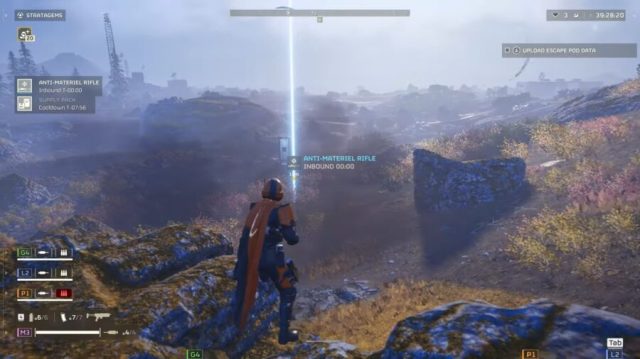
The APW-1 Anti-Materiel Rifle is a Stratagem in the Patriotic Administration Center section of the Stratagem tab in the Ship Management menu. The weapon will need to be unlocked with 5,000 Requisition Slips once you’ve reached Level 2.

Supply Stratagem Permit
APW-1 Anti-Materiel Rifle
A high-caliber sniper rifle effective over long distances against light vehicle armor. This rifle must be aimed downscope.

Stats
Call-In Time: 3 sec
Uses: Unlimited
Cooldown Time: 480 sec
Stratagem Item Traits: 1 Support Weapon and 1 Hellpod


MORE IN HELLDIVERS 2:


Helldivers 2 Use The Anti-Materiel Rifle

Once you own the Anti-Materiel Rifle, be sure to incorporate it into your loadout before making planetfall. On the ground, have the weapon dropped from above using the following input:

⇩⇦⇨⇧⇩(Down, Left, Right, Up, Down)

Now that you’re the designated team sniper, you’ll want to hold the back line, especially since the weapon must be aimed downscope to fire effectively. While it can be hipfired, there is no onscreen reticle to make a judgment about where to land your shots.

The Anti-Materiel Rifle has three magnification levels: 50m, 100m, and 200m, allowing you to hang pretty far back as you plink-plink the enemy. If only most planets weren’t so shrouded in fog and dust. But if you do have clear skies and a jump pack, make for the high ground and take an overwatch position.

Given the need to use it while aiming down the scope, you may want to best optimize settings associated with first-person mode switching using our guide on the subject. Additionally, the Anti-Materiel Rifle is best used either crouched or prone to counter the heavy muzzle rise and recoil. 

Ideally you will want to avoid using the weapon on unarmored, squishier enemies, although it does seem to have penetration, and may be effective at thinning out densely packed mobs. At that point, you will be contending with the Anti-Materiel Rifle’s plodding rate of fire instead.

It goes without saying that your backup weapon would ideally be the polar opposite of the Anti-Materiel Rifle as far as rate of fire is concerned.

Despite it commonly being recommended for use exclusively against the armored ranks of the Automatons, the Anti-Materiel Rifle is great for shredding the armor-like carapace of certain Terminid species as well, right before switching to a mop-up secondary weapon.


I Put $50,000 in a Shoe Box and Handed It to a Stranger Because He Said He Could Get Me Into Helldivers 2


That’s all the tips and tricks we know for the Anti-Materiel Rifle in Helldivers 2.

Helldivers 2 Black Screen On Startup Error Fix

Encountering a black screen when launching any game is even more disconcerting than when it simply crashes to the desktop, and this is something you’ve probably experienced in Helldivers 2. This guide has every known fix for the black screen on launch error with Helldivers 2.

UPDATED April 16


Helldivers 2 Update Patch Notes 01.000.203 Apr 16


Helldivers 2 Black Screen On Startup Fixes

Surprisingly, there are multiple reasons for the black screen of death on launching Helldivers 2, and not all of them are related to GPU issues. Whether the black screen simply freezes, or sends you crashing back to the desktop, here are a couple of things to try.


MORE IN HELLDIVERS 2:


Disconnect PlayStation Controller

For some odd reason, having a PlayStation controller plugged-in appears to cause the issue for some people on Steam PC. Even connecting the controller mid-game can cause the issue to occur. The post below has a perfect step by step guide to resolving the issue.


Comment
byu/Aureum_Castrum from discussion
inHelldivers


Reset Config File

You can force the game to reset its settings to default. Navigate to C:\Users\[your PC name]\AppData\Roaming\Arrowhead\Helldivers2 and rename user_settings.config to user_settings.config.old or anything of your choice. This will create the config file anew, and should resolve the black screen glitch.


Potential Black Screen fix
byu/Aureum_Castrum inHelldivers


While users on the SteamCommunity that have had success with this method generally recommend deleting the file, you’re better off renaming it just to be safe.


Windowed Or Fullscreen Mode

Alternatively, you can try modifying that config file yourself, switching the fullscreen setting to ‘false’. This can mitigate the black screen issue by launching the game in a borderless window.


Sony Promises Helldivers 3 Will Debut With at Least Two, Possibly Three Servers


Verify Game Files

That most common fix for Steam games that are experiencing technical issues. A corrupted installation is said to be the cause of the problem for some players on Steam PC. You may want to either perform a fresh install, or simply use the “Verify integrity of game files” function by right-clicking Helldivers 2 -> Properties -> Installed Files. Here’s a detailed guide to verifying game file integrity from Steam itself.

As an added aside, always make sure the game is updated. Since Helldivers 2 is an online-only, Games-as-a-Service (GaaS) title, if your game version isn’t synced with the server, you will not be able to login properly.


Helldivers 2 Black Screen AMD GPU Specific Fix

AMD 7000 series GPU owners have a particular issue with Helldivers 2, and this Steam Community user details a step by step tutorial to fix both black screen on launch as well as persistent crashes.


That’s every known fix for the black screen on launch error in Helldivers 2.