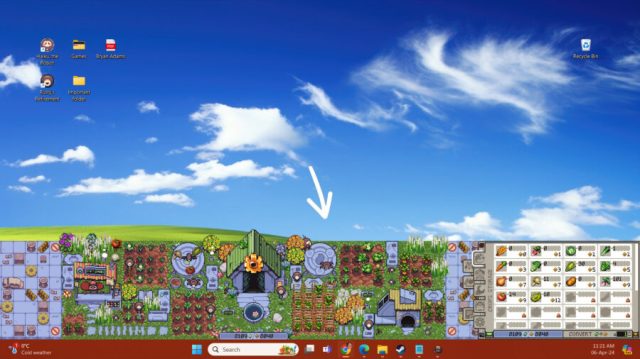
A compilation of patch notes for the idle farming sim, Rusty’s Retirement, that released on April 26. In descending order, from latest to oldest, the complete patch notes are below:
UPDATED June 18
Build 1.0.15 June 16
Hey folks, here are a few fixes for issues that appeared in the new QoL update:
-
Zoom in and out was incrementing the camera's scale by multiples of 2 - it is fixed and will now increment by 1 as intended.
-
Moving the camera in vertical mode with the arrow keys was also zooming in and out due to some old code still being active, this has also been fixed now.
-
Fixed some weird camera clamping issues that were causing the camera to jump around.
-
Trackpad scrolling only works in horizontal mode for now until I fix some of the issues that popped up on vertical farms.
-
Golden pumpkins were popping with one click when they should have been popping after 36 clicks. Now they pop after 36 clicks and this should help prevent harvesting giant golden pumpkins by accident.
-
Splunk’s new ‘Do not seed’ sign should be fixed.
-
Moving houses or buildings on top of themselves would free up the land beneath them allowing people to build where they shouldn't be able to. This has been fixed because it was causing all sorts of bugs and issues.
-
And... Estonian has been added to the game as a language option! (let's hope it doesn't break anything)
Thank you, and it's great to see that people are happy with the new update!
Build 1.0.15+ hotfix
Quality Of Life Update! Build 1.0.14 June 14
Hey folks,
I’m happy to finally add some quality-of-life changes to the game! Thank you for your patience, I know this took a little longer than expected, and it’s because I took a well-deserved 2-week break from the game to recharge my own biofuel-filled batteries.
1. Move buildings one tile!
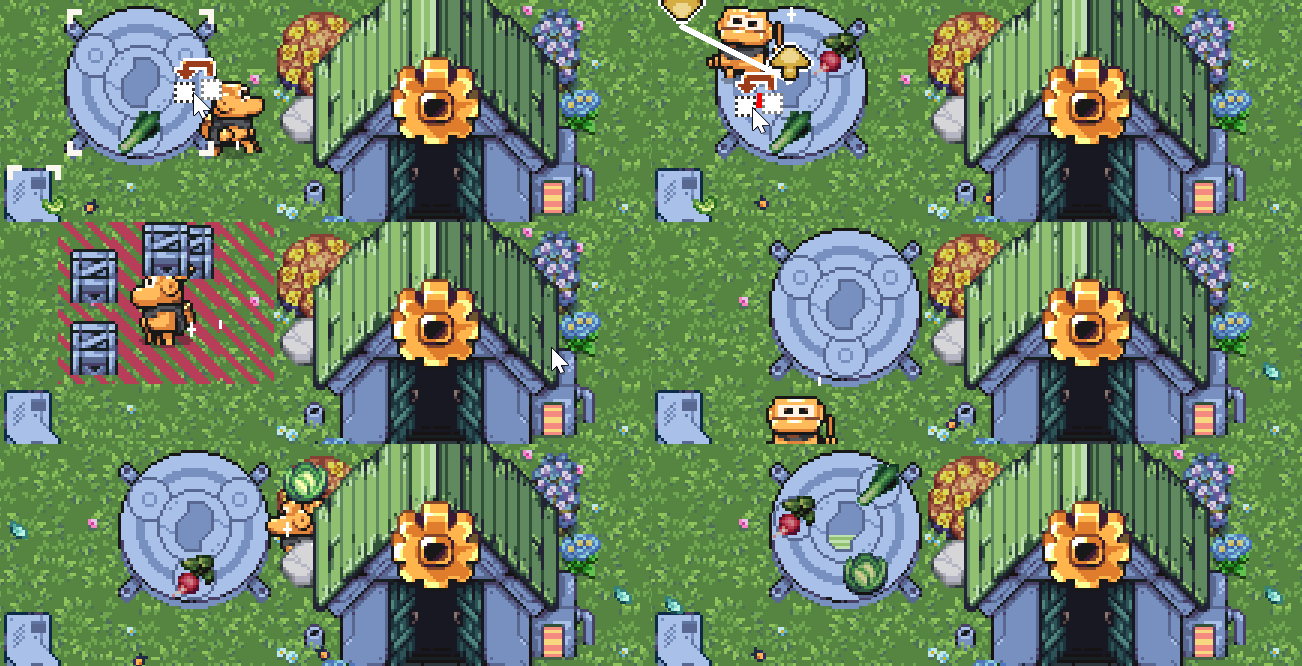
So many people reached out to me to ask if I could add the functionality allowing you to move buildings one tile across. I even had personal friends reach out to me to ask for this feature - so yeah, it was a big one!
You can also move bushes and decorations now.
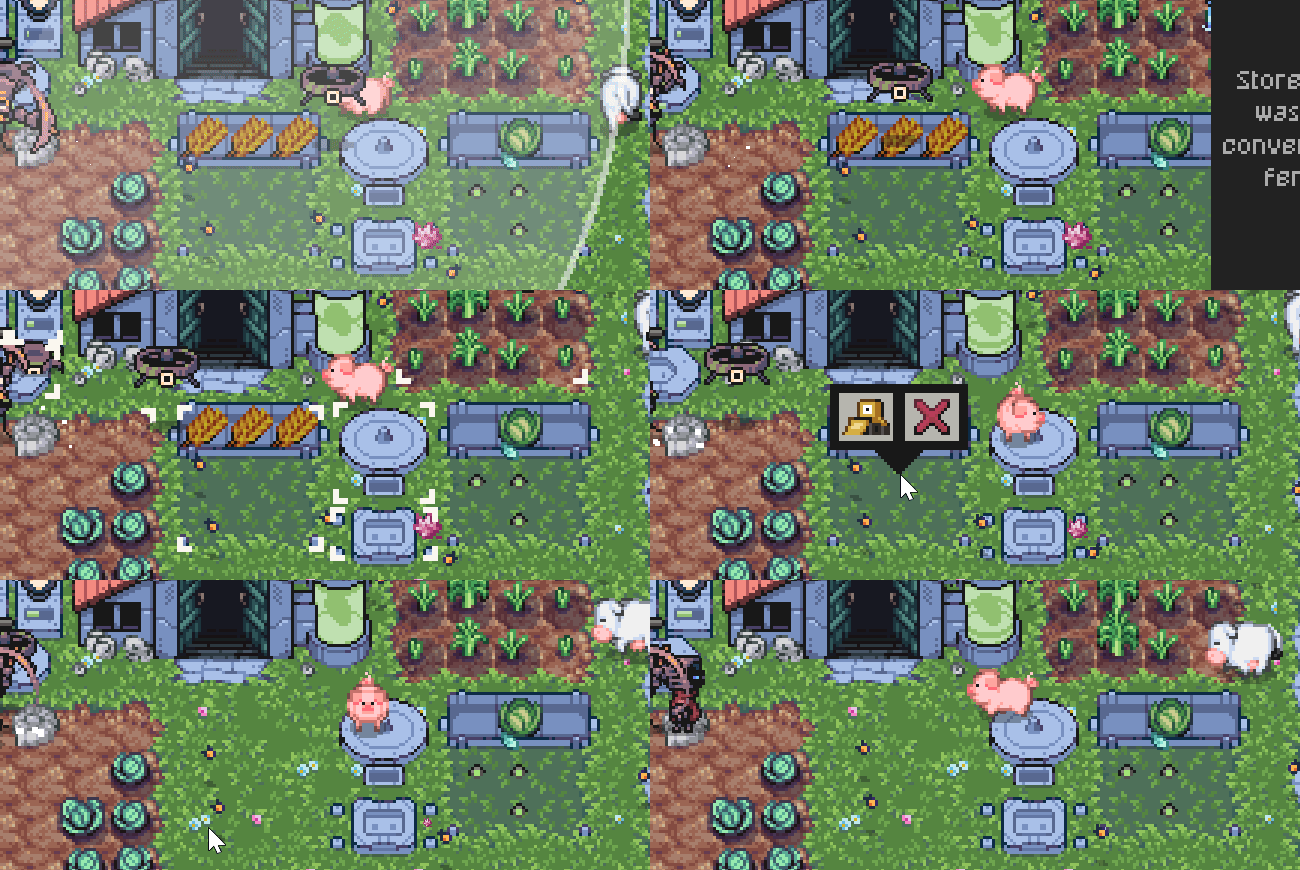
2. Move animals (and destroy empty feeders)
I’ve added a new button to the ‘Animal tab’ that allows you to move animals between feeder slots. Also, if a feeder is completely empty then you can now destroy it if you so wish.

3. Improved bees and butterflies
Bees received a rework and I will briefly explain how they now function. All bees on the farm are evenly spread across beehives and they will only visit bushes in range of their designated beehive. If you place a new beehive, bees will automatically migrate to the new hive. Beehives still produce biofuel, and berry bushes now have a maximum capacity of bees that can visit at the same time.
Butterflies essentially work the same way minus the capability to produce biofuel at a beehive.
Those are the 3 main big things,
but I’ve also added a bunch of small features too:
-
You can now use the arrow keys to move around the farm. Tip: hold down Shift + Arrow key to speed up the camera panning.
-
You can also use the trackpad scroll to move around the map.
-
Golden Metal Pumpkins are now harvestable. You just have to click on it a lot to pop it.
-
You can disable/enable bot stations. This will prevent the bot from recharging and consuming biofuel. This is a bit of an advanced feature so I decided not to make the button too obvious.
-
Bot biofuel consumption after upgrading has been lowered slightly. Capacity upgrades still add 1 biofuel but speed upgrades now add 0.5 biofuel (the total is rounded).
-
Splunk has a new sign available in the shop. The ‘Do not seed’ sign will prevent Splunk from planting crops.
-
Splunk will now plant on empty crop patches that are occupied by a giant crop or a fossil.
-
The inspect function will now show you how many waterings a crop still needs and how many harvests a crop has remaining.
-
I have also added a notification icon to some of the tabs, so you can quickly see if you have anything new to unlock without having to cycle through all the tabs all the time.
-
And lastly, I gave the remove crops button a new icon so it wouldn’t be confused with the demolish buildings icon.
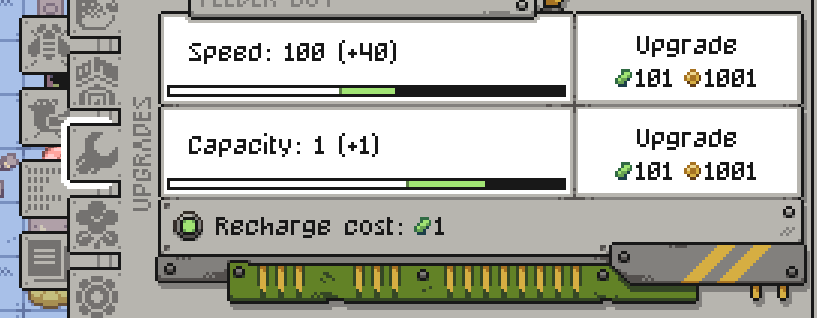
(The green light next to the recharge cost is the disable/enable button - very subtle)
Performance improvements
Thank you everyone for helping me to test the performance branch. To minimize the impact on existing players who are enjoying the game without any problems, we’ve added a new dropdown under Settings > Graphics, where you can choose how the transparent background is rendered.
-
Colorkey - sets the background color to black and then converts any black pixels into transparent ones.
-
Alpha - sets the background transparent and is overall more performant but the only drawback is that it does not work well with overlays.
-
Green screen - sets the background color to green and converts any green pixels into transparent ones. This setting is mainly used by streamers.
Most people will remain using Colorkey but if you are having performance issues with frame rate, then please try switching to Alpha. In the future, we hope to add a plain ‘windowed mode’ which is a failsafe for everything that could possibly go wrong and it will probably benefit Linux users as a bonus.
---
That's it for today folks, I very much look forward to developing new content for the game now that this stuff is out of the way. As always, don't hesitate to let me know if there are any bugs or any features you'd like to see improved/added
Build 1.0.13 May 15
-
Achievements will try to trigger more often. If not, then please check that Steam is connected otherwise they will not trigger.
-
Backups of your savefiles will happen automatically every minute. I hope this will help in case a savefile gets corrupted.
-
Made some improvements to the Japanese and Chinese-simplified translations.
-
Added credits for the translators
Looking for people to test the performance beta branch!
We plan to switch to a different transparency method to improve performance on high-resolution and high-refresh rate monitors. This new method now looks at transparent pixels and keeps them transparent. The previous transparency method looked for pixels with the color key (#000000 black or #00ff00 green) and then turned them transparent resulting in a poor frame rate.
If you’re interested in testing the new method, then please enable the performance test branch under Betas (password: performancetest). You’ll know if you’re playing the right build because in the game it will say 1.0.13++.
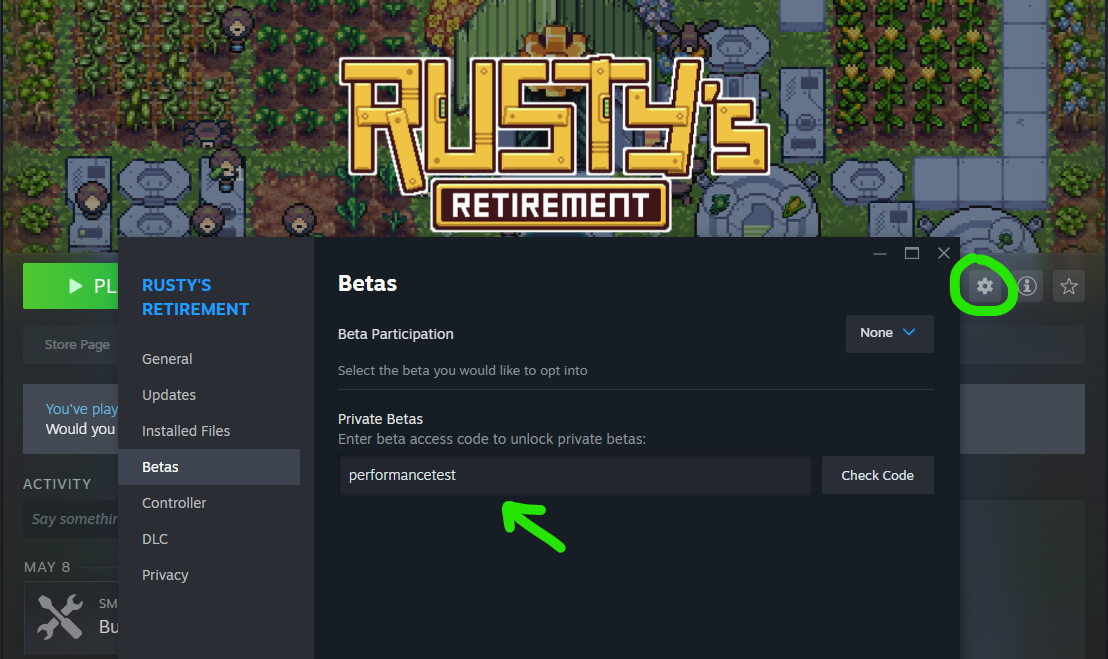
Please test as many things as possible, such as switching monitors, changing the taskbar/sidebar size, etc. Remember that if the game gets stuck on a weird resolution, you can use R or T to reset the camera and UI. And I encourage non-big-monitor-people to try it as well. You can join the discord server to leave feedback: https://discord.gg/PbshYaU8Mr
Known issue: Overlays on top of Rusty’s Retirement become translucent so please refrain from using overlays on the game.
I look forward to your feedback, thank you!
Build 1.0.12 May 8
Hey folks,

Here are some more fixes and additions to the game:
-
Fixed: Echo no longer gets stuck if you delete the bot station while he is working on it.
-
Fixed: Move/build building no longer checks the mouse position, but rather the tile that was clicked on. -> face palm moment. This should lead to more reliable placement, no more overlapping buildings or accidentally placing stuff out of range.
-
Fixed: You can no longer accidentally upgrade, demolish, or move buildings with a right-click or middle-click. Left-click is now the main button action.
-
Made some improvements to the ‘move’ function so that it works more reliably.
-
Fixed: Biofuel bots will 100%-most-definitely ignore the lowest crop that’s available in your inventory (unless they have no other choice)
-
Added: Removed the strange computer from peoples farms. It will spawn when you create a new farm but it is now treated as a decoration so that means you can demolish it if you’d like. (This should also help people trigger the Architect achievement)
-
Added: You can now inspect berry bushes, no more guessing which ones you have already planted.
-
Added: Berry bushes now also appear under Pinion’s statistics tab.
-
Added: Splunk now ignores giant crops, and Slate who might be digging up a fossil on an otherwise completely empty crop patch.
-
Fixed: After using the demolish function in the bees tab, clicking to place a bush maintains the bulldozer icon.
-
Added: When focus mode is enabled, in other words, when crop/biofuel production time is doubled, the crop growth times will also double in the UI window that pops up when hovering over a crop.
I just wanted to quickly clarify that the ‘black screen bug fix’ actually fixes the game for people who couldn’t interact with it in any shape or form. You may occasionally encounter a black screen, and if the game is responsive, restarting should fix the issue. We’ve noticed that if the game is not in focus when it loads then it might not trigger the transparency correctly. We’re working on fixing this too but at least players can now interact with the game!
Thank you!
1.0.11 – Black screen fix (?) May 6
Hey folks,

We might have found a permanent solution to the black screen bug which was making the game non-interactable for some players - this thing has been haunting me for days now.
The temporary fix was to disable fullscreen optimizations on the exe file. As expected, most players didn't know what was causing the issue and just closed the game (potentially forever). I tried my best to communicate the temporary fix in the forums and updates, but to be fair it's not the player's job to check these all the time.
SOLUTION: We've added a small script that will run and add this option for you before the game is opened!
That means we had to enable a setting on Steam's side to install .NET 4.7.2 before running the script/game. When the pop-up from 'Steam Client Service' appears please click yes allowing Steam to add the changes.
After that, you will see Steam running the install script for Microsoft .NET before opening the game (this might take a short while but don't worry it should only happen once).

After that, you should be good to go!
I hope that this is the end of the dreaded bug, but I will be keeping a close eye on the Steam forums for any issues. Thank you!
Edit: I should clarify that the biggest issue with this bug was that the game was completely unresponsive for a lot of players. Now you might still get a black screen but if the game is interactable then you should be able to restart to fix the problem.
We've noticed that a black screen appears if you click onto another application while the game is loading. I'm still looking into fixing this issue, but for now, players that were having problems can at least interact with the game.
A big thank you to NauM, a professional Unity Developer! We've partnered up to work on more technical issues like these, and he has been a huge help over the last few days.
And to the developer of Outcore who also made a desktop game! He encountered the same issue and kindly shared his code to help us get this fix out as soon as possible.
Make sure to check out Outcore, it's free and it has Overwhelmingly positive reviews!
Build 1.0.10 May 5
If you are experiencing a black screen and restarting doesn't help, please follow this step-by-step guide on how to fix it: https://imgur.com/a/7LOAktG
Black screen fix!
Go to Rusty's Retirement in your Steam library > Gear icon > Manage > Browser local files
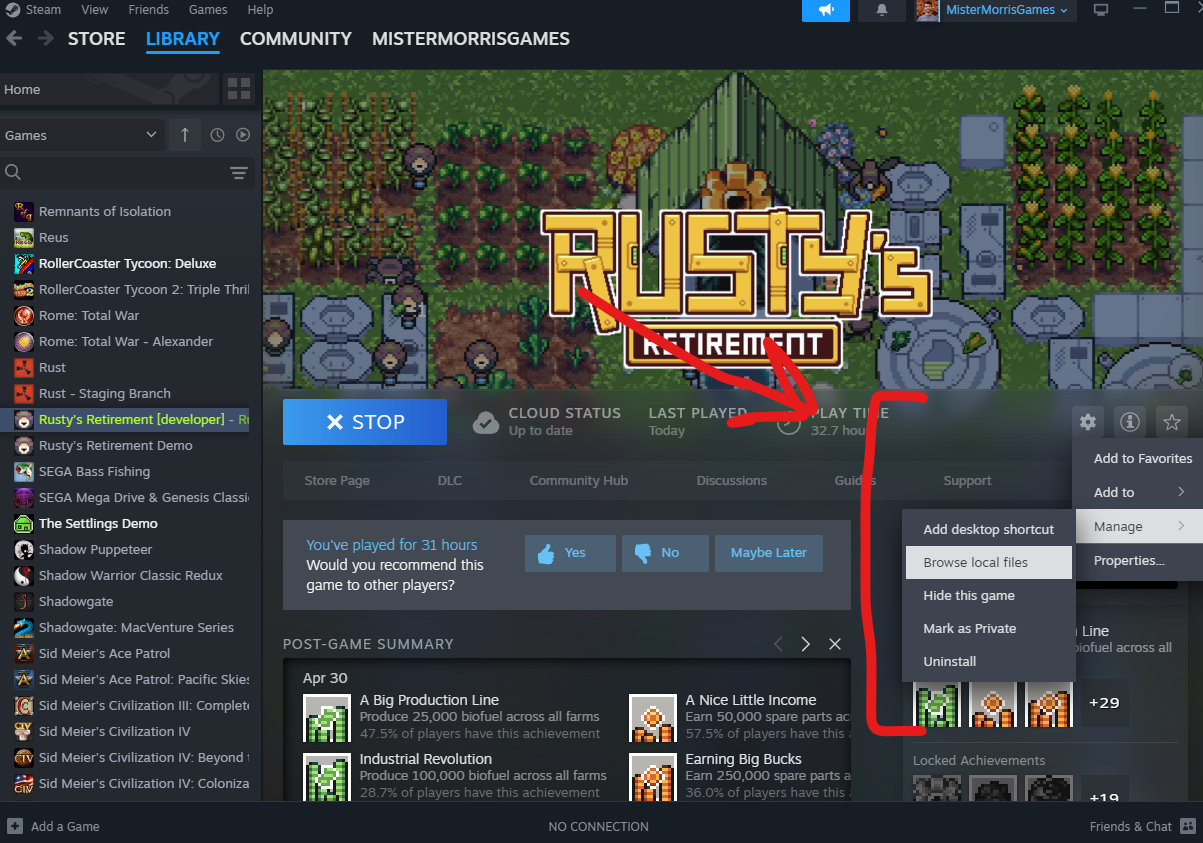
Select Rusty's Retirement.exe > Right-click > Properties
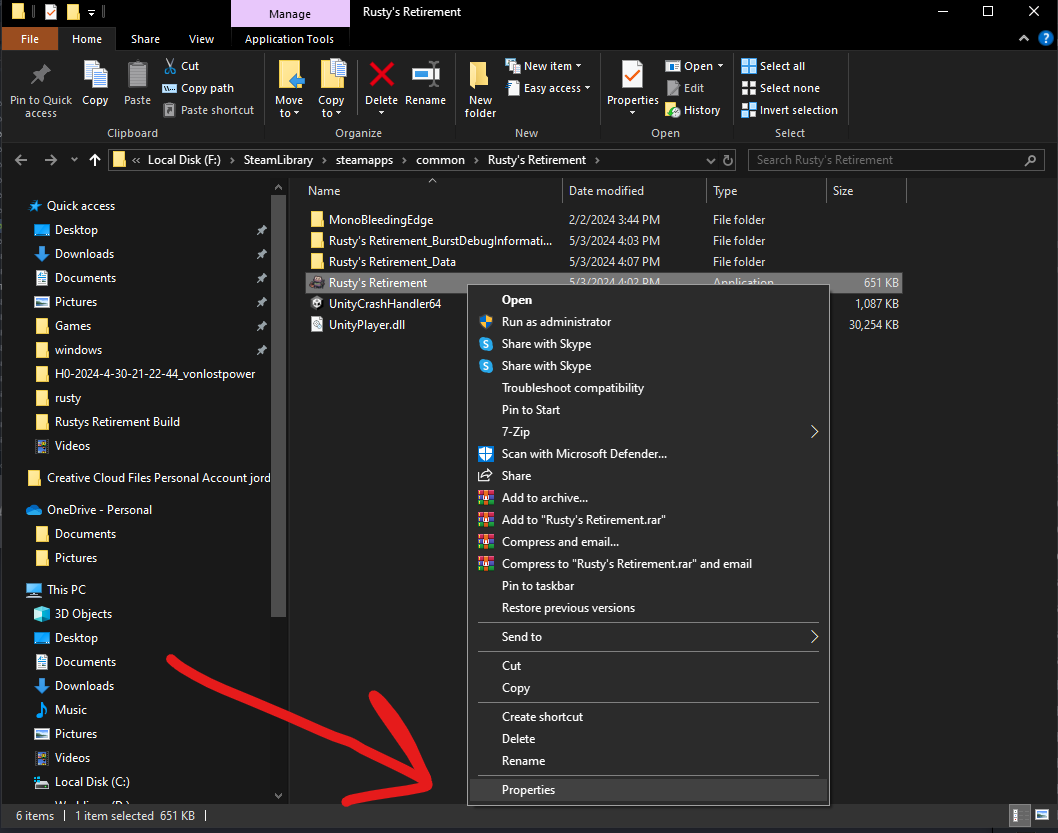
Go to the Compatibility tab > check Disable fullscreen optimizations > you should be good to go!
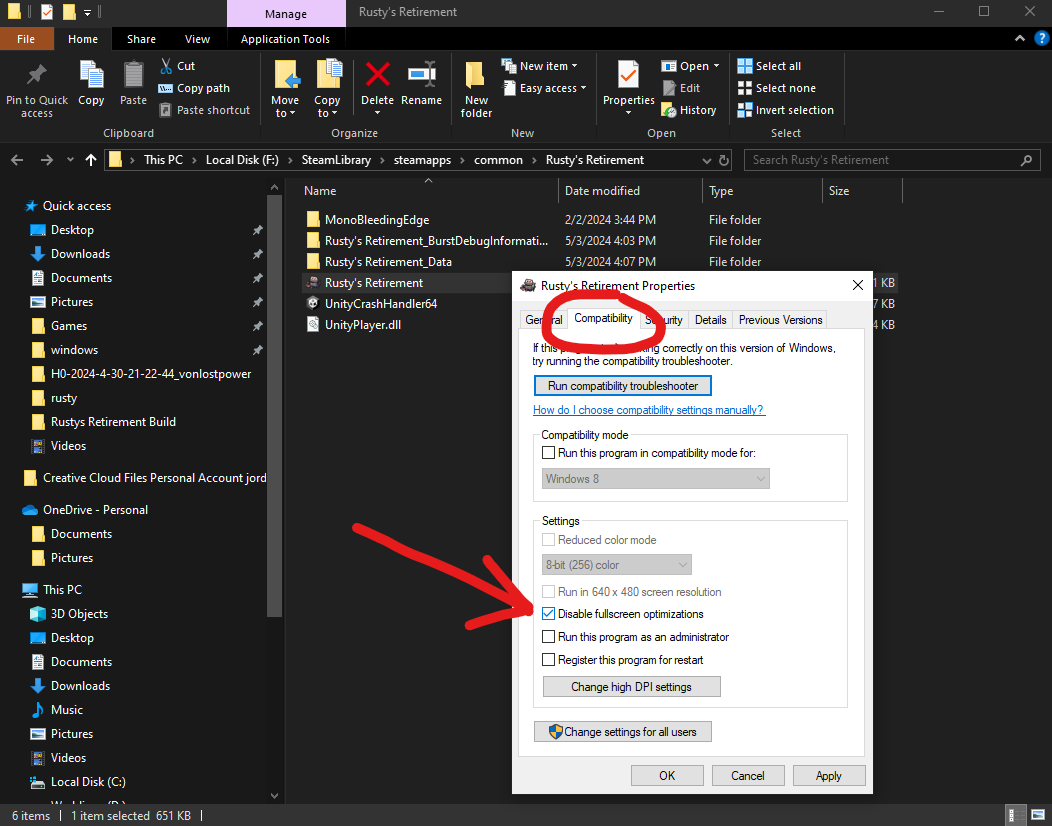
We are still investigating the black screen bug on Windows. We have found a fix but it’s a bit tricky to get it working. For now, please follow the guide above to fix it!
—
Hey folks,

Here are some tweaks that have been made to the game. Hopefully, it will ease some balancing issues and frustrations.
-
Splunk no longer wanders off the screen.
-
Splunk will wander around less if there is work to be done.
-
Splunk also received a bit of a speed boost + 25%
-
Feeder bots were still causing a lot of frustration among players, so they will now take the lowest crop that is available in your inventory.
-
To remove further frustration, Biofuel bots will now ignore the lowest crop available in your inventory. However, they will still use said crop if there is no other option available - this is to prevent the early game from breaking.
-
Animals will eat less crops and roam around the farm more. They should still poop roughly the same amount.
-
Added a check to retroactively fix any unlocked lands that were still acting as if they were blocked.
-
Fixed an issue where the game was getting stuck on Mac when switching to another desktop or fullscreen application.
Idea:
Splunk currently seeds a crop patch if it is entirely empty. I was thinking of changing it to > Splunk will seed a crop patch that is half empty. The only problem with this approach is that he will run around the farm a lot more and as a result it may lead to him becoming even less efficient from constantly walking back and forth.

Let me know what you think!
Thank you for all your continued support!
Build 1.0.9 May 3
Hey folks,

Apologies for the rollback yesterday, 1.0.8 was live for 1.5 hours, and people were immediately reporting issues with the transparent background, so we rolled back to the previous 1.0.7 build. For now, I’ve removed the performance improvements with the transparent background until we figure out what’s causing the issues.
-
Improved performance for bigger resolution / high refresh rate monitors. We’ve updated Unity to a much newer version (2022 LTS) and we’ve removed some unnecessary computing tasks around how the transparency was being drawn. Please let me know how this works, it might not be perfect but it should be a lot better.
-
Credited the people who spent three whole days helping me with this issue!
-
With the improved performance implementation, some of the UI elements had to be shuffled around.
-
Save file improvements! After talking with the folks who made the save file plugin, we have improved the code, added checks to catch errors, and lastly added automatic backups which will load if the original file is corrupted.
-
The new save code only writes once to the file when needed so hopefully power outages and sudden crashes will no longer affect save files. While I cannot restore previously corrupted files, I hope this update will prevent files from being wiped in the future.
-
In-game timer should now update correctly and according to real-time. Previously it would either go faster or slower than real time depending on the frame rate set in the graphics settings.
-
The first piece of the blocked land on the right side is now actually blocked lol.
-
Previously, saving while Rusty was clearing a piece of land would lock that piece of land when loading the game back up. This should be fixed now!
-
Restarting the game should automatically detect your monitor's resolution and set the game to that resolution. Before you had to physically press R or T to reset the camera/resolution.
-
Added more checks for achievements like 10 Million Spare Parts, 1 Million Biofuel, 1 Million Watered Crops, and 1 Million Harvested Crops. There are now 3 different places in the game that can trigger these achievements (on every load) so hopefully they will work more consistently.
-
Speaking of 1 Million Harvests, I have decided to lower the achievement down to 250,000 Harvests. This was a miscalculation on my part and to me 1 Million seems a little too far out of reach. Running the game for days on end is not fun - especially when the game’s content does not currently match the hours needed to reach those numbers. I think lowering it to 250k still makes it a grindy-idle achievement but it doesn’t outstay its welcome.
What I hope to tackle next:
-
Performance on high-refresh rate monitors
-
Balancing patch for bees, butterflies, and berry bushes. Currently, how they behave is too confusing and not very reliable.
-
Adding more quality-of-life features and content!
Thank you! I was supposed to make a week 1 recap today but that will have to wait until tomorrow now 
Build 1.0.8 [REVERTED] May 2
[REVERTED]
Reverted the update because people were reporting completely black screens, and missing save files on Mac. Luckily, only the folder where the save files were stored changed. This rollback should restore them.
Hey folks,

Here are some more fixes and improvements to the game!
-
Improved performance for bigger resolution / high refresh rate monitors. We’ve updated Unity to a much newer version (2022 LTS) and we’ve removed some unnecessary computing tasks around how the transparency was being drawn. Please let me know how this works, it might not be perfect but it should be a lot better.
-
Credited the people who spent three whole days helping me with this issue!
-
With the improved performance implementation, some of the UI elements had to be shuffled around.
-
In-game timer should now update correctly and according to real-time. Previously it would either go faster or slower than real time depending on the frame rate set in the graphics settings.
-
The first piece of the blocked land on the right side is now actually blocked lol.
-
Restarting the game should automatically detect your monitor's resolution and set the game to that resolution. Before you had to physically press R or T to reset the camera/resolution.
-
Added more checks for achievements like 10 Million Spare Parts, 1 Million Biofuel, 1 Million Watered Crops, and 1 Million Harvested Crops. There are now 3 different places in the game that can trigger these achievements (on every load) so hopefully they will work more consistently.
-
Speaking of 1 Million Harvests, I have decided to lower the achievement down to 250,000 Harvests. This was a miscalculation on my part and to me 1 Million seems a little too far out of reach. Running the game for days on end is not fun - especially when the game’s content does not currently match the hours needed to reach those numbers. I think lowering it to 250k still makes it a grindy-idle achievement but it doesn’t outstay its welcome.
What I hope to tackle next:
-
Save files are magically wiped if the game quits unexpectedly. From reports, this seems to be coming from either an antivirus or a power outage on the PC. Unfortunately, the backups I implemented a few patches prior are also wiped, so it's not how the files are saved or loaded, but something else. I use a well-known plugin for saving and they don't understand what could be causing it either.
-
Balancing patch for bees, butterflies, and berry bushes. Currently, how they behave is too confusing and not very reliable.
-
Adding more quality-of-life features and content!
Thank you for all your continued support! Tomorrow I hope to make a nice recap on how week 1 went because it's been pretty amazing!
Build 1.0.7 April 29
This one is only a short one because I’ve mainly spent the day investigating the hi-res / high refresh rate monitor issue with some developer friends (more on that below).
-
Fixed: Some houses were unmoveable because sometimes another collider would block the ability to click and select the house. Now no colliders are blocking this action so it should work as intended.
-
Fixed: You can no longer upgrade a building that is still being built which would cause Echo to get stuck.
-
Fixed: Steam cloud saves for Mac.
-
Not entirely sure about this one because I couldn’t replicate it on my end but people have reported that connecting to Twitch could be creating an infinite loop in the code. I’ve added a 5-second buffer between connecting and checking whether the game is still connected to Twitch. It’s a bit of a shot in the dark but hopefully it’ll keep the game from crashing.
-
Added: Crop/building information panels now move to the right when setting the vertical farm to the left side of the screen. Zooming is still a bit wonky but I hope this helps in the meantime!
Regarding performance issues on hi-res monitors, we’ve spent the entire day testing and looking into different potential causes, and we’ve narrowed it down to two or three things that look promising. This week we will continue with testing and we will try to get it fixed!
It seems like the issue is easily replicated on high refresh rate monitors (i.e. 144hz), so I would appreciate it if you could send me your specs here in the thread so that we can identify a common pattern. For now, some people have reported that lowering the frame rate and setting the on-demand rendering to 3 helps.
Thank you so much!
Build 1.0.6 April 28
Hey folks,

More fixes and improvements are on their way!
-
Feeder bots will look at your inventory and choose between the 3 lowest crops available. This should help push out low-level crops from your inventory, and that way biofuel bots are more likely to use better crops. Biofuel bots choose at random to evenly distribute crops.
-
Added an extra check for the Play for 1hr/24hr/48hr achievement.
-
Moving a house, saving, and then reloading would lock their respective features. Now when moving a house, it should keep the features you’ve unlocked.
-
Fixed random individual crops from never getting watered! Thank you ArtificialColors for finding out how to reproduce this one because I had been scratching my head all weekend.
-
If you moved a bot, the game would think that you demolished it and as a result, their upgrade cost would be reduced (which is expected behavior for demolishing, just not for moving). Now, moving a bot doesn’t affect the upgrade price.
-
Updated “How does Splunk work?” Help description.
-
You can now use the middle mouse button to drag the camera around while moving or building without it triggering the placement.
-
Pressing “R” should resize the game to your monitor. I have also added an alternative shortcut “T” which does the same thing but this code checks other monitor parameters. If the game is locked into some weird resolution, please try using these two shortcuts.
-
Biofuel converters should now complete regardless of their visual indicator, hopefully, this will stop biofuel converters from getting stuck.
-
Slate will now dig more fossils!
Lastly, I would like to highlight a known issue with high-resolution monitors, for some unknown reason, when using a hi-res monitor the game uses a lot of resources. For now, please try playing around with the graphics settings by lowering the frame rate and setting on-demand rendering to 3 - a few people have reported that this helps.
Tomorrow I am meeting with some tech-savvy developer friends to have a closer look into the issue!
Thank you for your patience in the meantime!
Build 1.0.4 April 27
Hey folks,

Here are a few more fixes and improvements:
-
Fixed unlocking the last crop in the list.
-
Adjusted some colors in the Blossom Forest map to better match the vibe.
-
Fixed decoration prices.
-
Feeder bots will now prioritize low-level crops and ignore berries.
-
Fixed an issue where fertilizer bots after a while would only fertilize one crop tile and return to base to recharge.
-
The game will now save when loading an existing save file or when creating a new one.
-
I’ve also added backup save files just in case. Occasionally, some Antivirus softwares would just wipe the save file. Now you can check if there is a backup (.bac) and copy-paste its contents over. Also, please mark this folder as safe in your Antivirus to prevent it from happening in the future:
-
I accidentally gave giant golden pumpkins a 100% spawn rate, this change was only live for 10 minutes before being reverted, so I hope it didn't affect many people 🤞
Thank you!
Build 1.0.5 - Fixed animals magically converting into cows when saving/loading. This only happened if you moved a feeder that already had animals occupying it. Unfortunately, this fix only applies to future savefiles and it doesn't fix past savefiles.
Build 1.0.3 April 26
Hey folks,

Thank you for the incredible launch so far! As expected, a few issues have come up, and I've made some quick fixes:
-
Fixed the maxed bot achievements. They were triggering when simply building a bot for the first time.
-
Fixed the blocked lands on the right side. Previously, they would load in already unlocked.
-
Fixed the non-pixel font on the blocked lands and house buttons.
-
Fixed an issue with loading save files. They occasionally got stuck on trying to load buildings with no animals. This only happened if a feeder was previously built in the exact same location.
-
Fixed an issue where if you had the move option selected and Rusty completed a task of moving another building, the move option would disable and act weirdly. It should behave as expected now.
-
If you unlocked a new map but left the game without saving then you would be softlocked into the first map until you completed that map again. I’ve added a check at the beginning of the load to see if you’ve unlocked the next map.
Thank you! It's late where I live so I will fix more issues in the morning!

(Oh, and you might have to exit Steam and relaunch the client to force the update to download!)
Those are the patch notes up through June 16 for Rusty’s Retirement.