DETROIT (MI) — Investigators are reportedly trying random garbage in their inventory to solve the murder of Travis Purcell, 32, the apparent victim of a brutal decapitation, according to an official statement.
This morning, Detective Michael Clark of Detroit PD’s homicide unit spoke to reporters about the authorities’ rush to beat the clock.
“At this point in the investigation, we have no suspects or potential motives. The culprit was thorough in covering their tracks and left very little evidence. However, while we might say that we are stumped, Detroit’s finest are relentless in their efforts to bring Travis Purcell’s killer to justice,” he said. “We have already begun the standard procedure of combining random shit from our inventory until a solution presents itself.”
The detective then presented a rubber duck and a canopener from the victim’s apartment out of his pocket, held them together, said, “hmm no dice,” then put them back in. He then pulled out that same rubber duck with a chinese take-out menu, said, “I don’t think that’s what rubber ducks are for,” and put them both in his pocket.
“It’s unfortunate but a lot of cases go unresolved for years this way,” said former Commissioner Suzanne Macklin. “Investigators try to be as thorough as they can but getting into the mind of a psychopath is incredibly difficult. Often times detectives won’t think to combine used chewing gum and dental floss to create a make-shift fishing line then using that fishing line to retrieve a key from a nearby claw machine until years after the case turns cold.”
Towards the end of his press statement, in a moment of desperation, Detective Clark pulled out his state-issued firearm and said, “I don’t think shooting the rubber duck would do anything,” before putting his weapon away.
UPDATE: Just after the press conference, police discovered a silver locket in a dumpster several miles away. Official statement by investigators detailed that “it’s a silver locket,” “looks important,” and “I should probably hold onto this just in case.”
At press time investigators are leaving no stone unturned, no hypothesis untested, and no random piece of shit uncombined with that silver locket they just found in the dumpster.
This hotfix specifically addresses an issue that some users have had with outdated/updating Epic Online Services.
However, it will not directly address other EOS related issue some users are reporting. We’re still trying to resolve that issue and will keep everyone updated as we know more.
Verifying steam game files will cause EOS to update to the latest version. We would suggest users do this even if they are not currently facing any issues.
For those users who have experienced issues with an EOS connection error, please ensure you have internet connection and verify the steam game files - in some cases this will rectify the issue. We are looking into other possible causes for this; If this or other issues persist, please submit contact customer support (click here) and we will investigate.
If after the hotfix - and file verification - users still find that their version of EOS has not updated, they will need to exit EGL (if it is installed), manually uninstall EOS, and then verify again. This will install the correct version of EOS.
See You in HELL-A
Those are the patch notes up through May 14 for Dead Island 2.
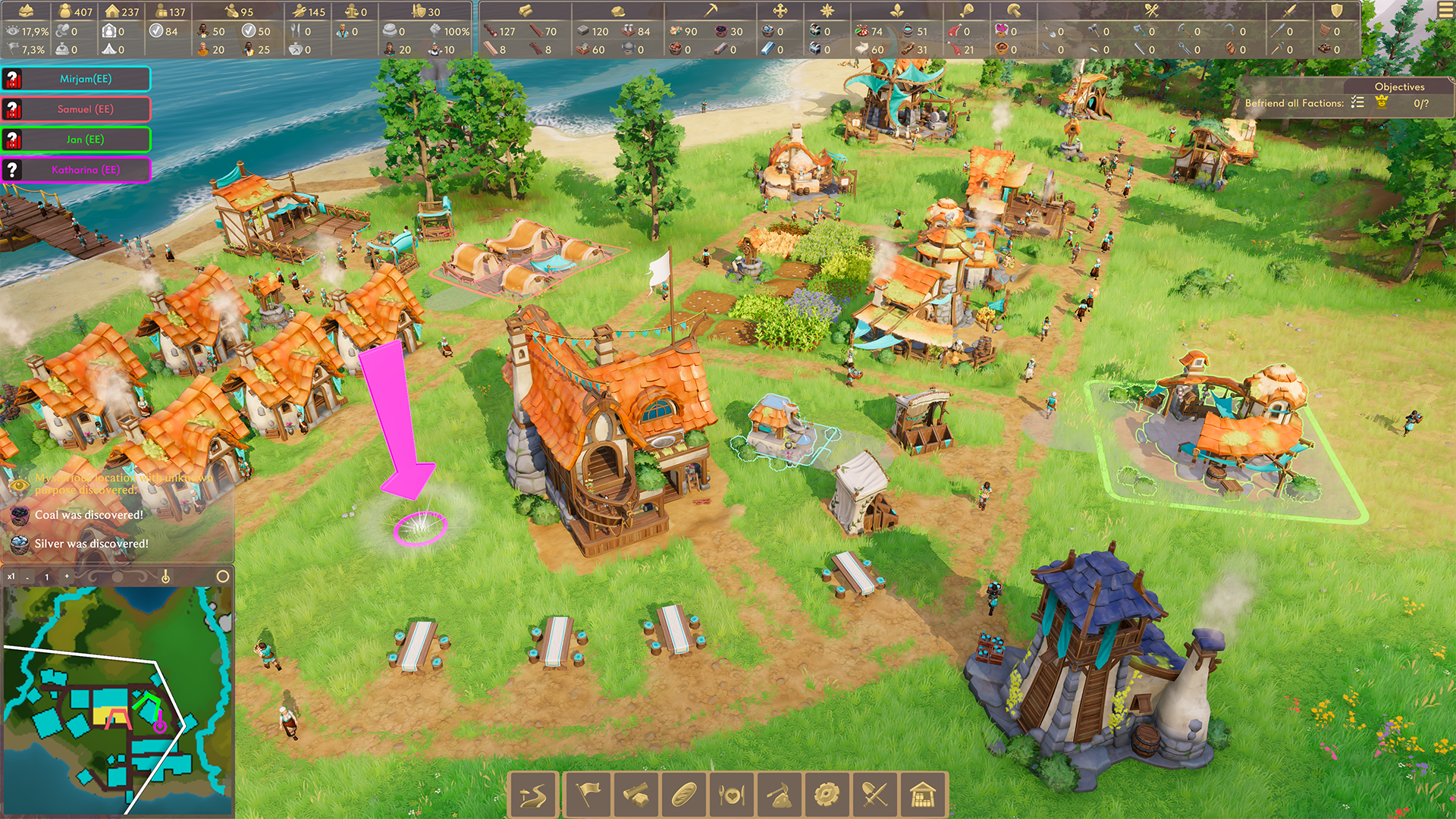
A compilation of all recent patch notes thus far for city builder Pioneers of Pagonia, in descending order, from latest to oldest:
UPDATED May 14
Patch 0.6.0 – New Quality of Life Improvements May 14
Atmospheric Lighting Setups, New Help Grid, Efficiency Statistics and More!
Dear Pioneers,
It's here! Our next update is packed with Quality-of-Life-Improvements and brand new features that will enhance your game experience of Pioneers of Pagonia. Take your time and read the patch notes carefully, because this update is full of great new stuff!
What’s new?
New Village State: Acquainted
Building Construction Mode: New Help Grid & Snapping to Road
Road Construction Mode: 90 Degree Snapping
Efficiency Statistics
Demolish Refund and Visualization
New Additional Light Setups
And many more!
Find the full list of changes in the patch notes below.
Developer Notes
The month of April just flew by and It feels like yesterday, that we've released our first multiplayer mode! It definitely made us really happy to watch all the co-op livestreams on Twitch. But, of course, there is still so much more to do! We kept ourselves busy by working on a bunch of new features and improvements we would like to share with you today.
New Village State: Acquainted
Being kind to other factions will pay off much sooner than before! The new state "Acquainted" is already achieved with 50% faction standing and will unlock some trade and gift offers with your friendly Pagonians from the neighborhood. This makes sure you can profit from the benefit of trade much earlier in the game.
New Building Construction Mode and Road Construction Mode
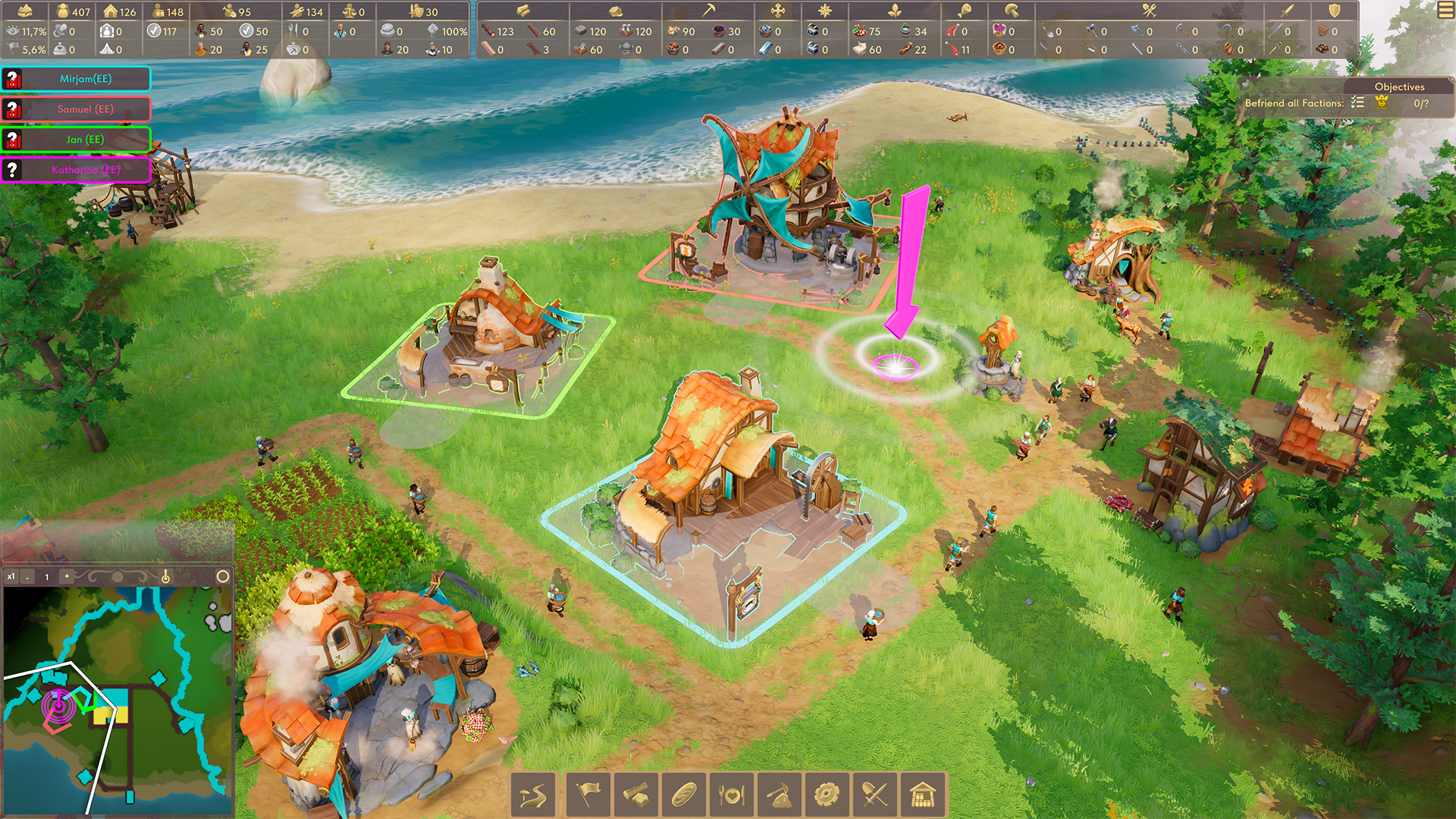
This one will please everyone, who prefers to plan out their settlements very accurately. First of all, there will be a new help grid, which will inform you about space available around the current building. This will make it much easier to estimate space for roads and other planned buildings!
Secondly, the entrance of a building will automatically snap to the road while hovering over an existing road or very close to it. This will definitely save you some time and make building your beautiful village much easier.
And lastly, this is for everyone, who loves 90 degree angles and straight lines: don't worry, we got you! The new road construction mode allows new planned roads to automatically snap to 90 or 180 degree angles if the current mouse position is close to those axes.
Efficiency Statistics
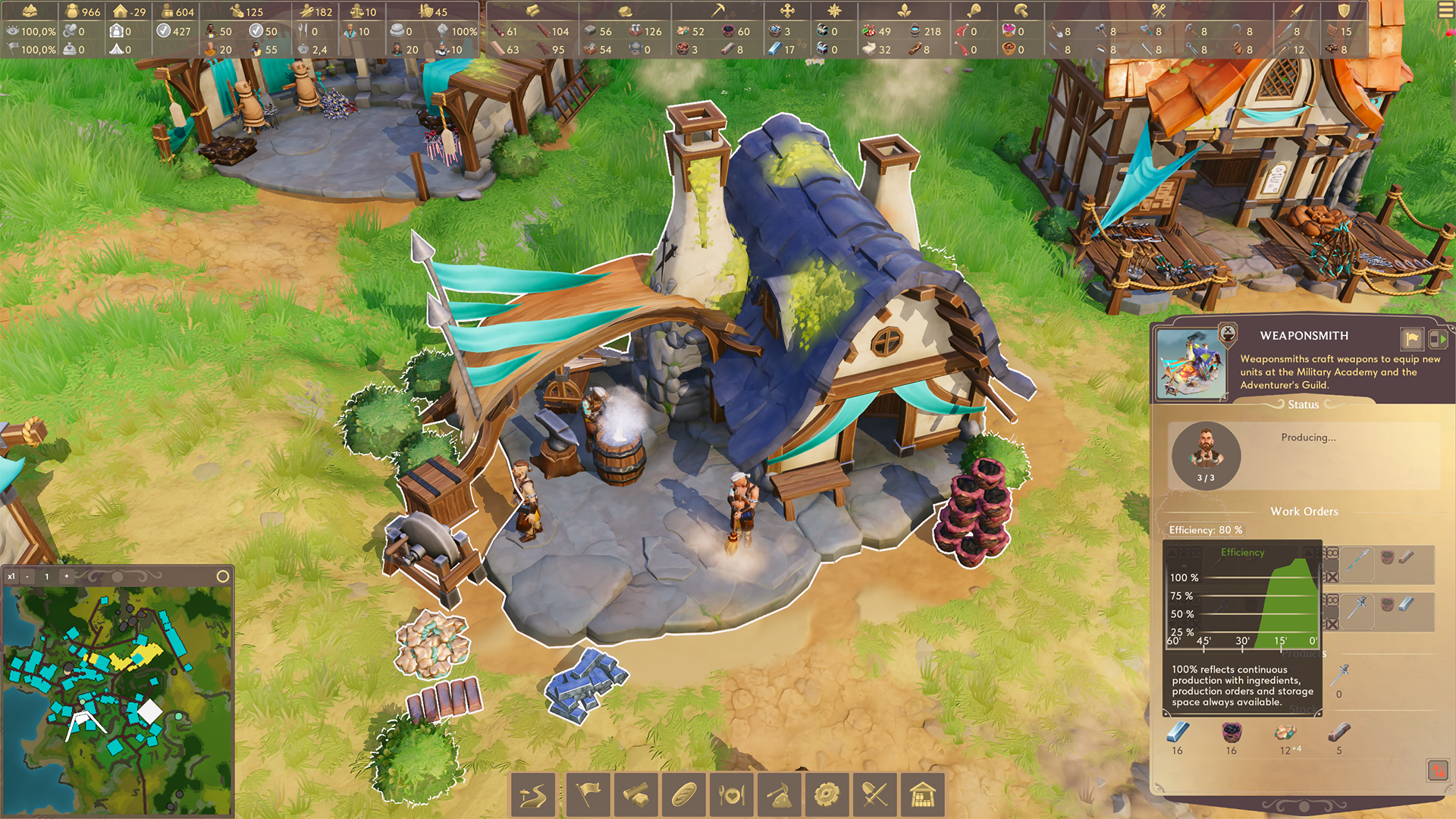
Now you will get even more information on individual buildings! Just hover over a building and it will show the efficiency value in the building tooltip. Also, if you select a building, the efficiency value is shown, too! This is very helpful to understand whether the building is operating continuously or not, and at which efficiency level.
New Additional Lighting Setups
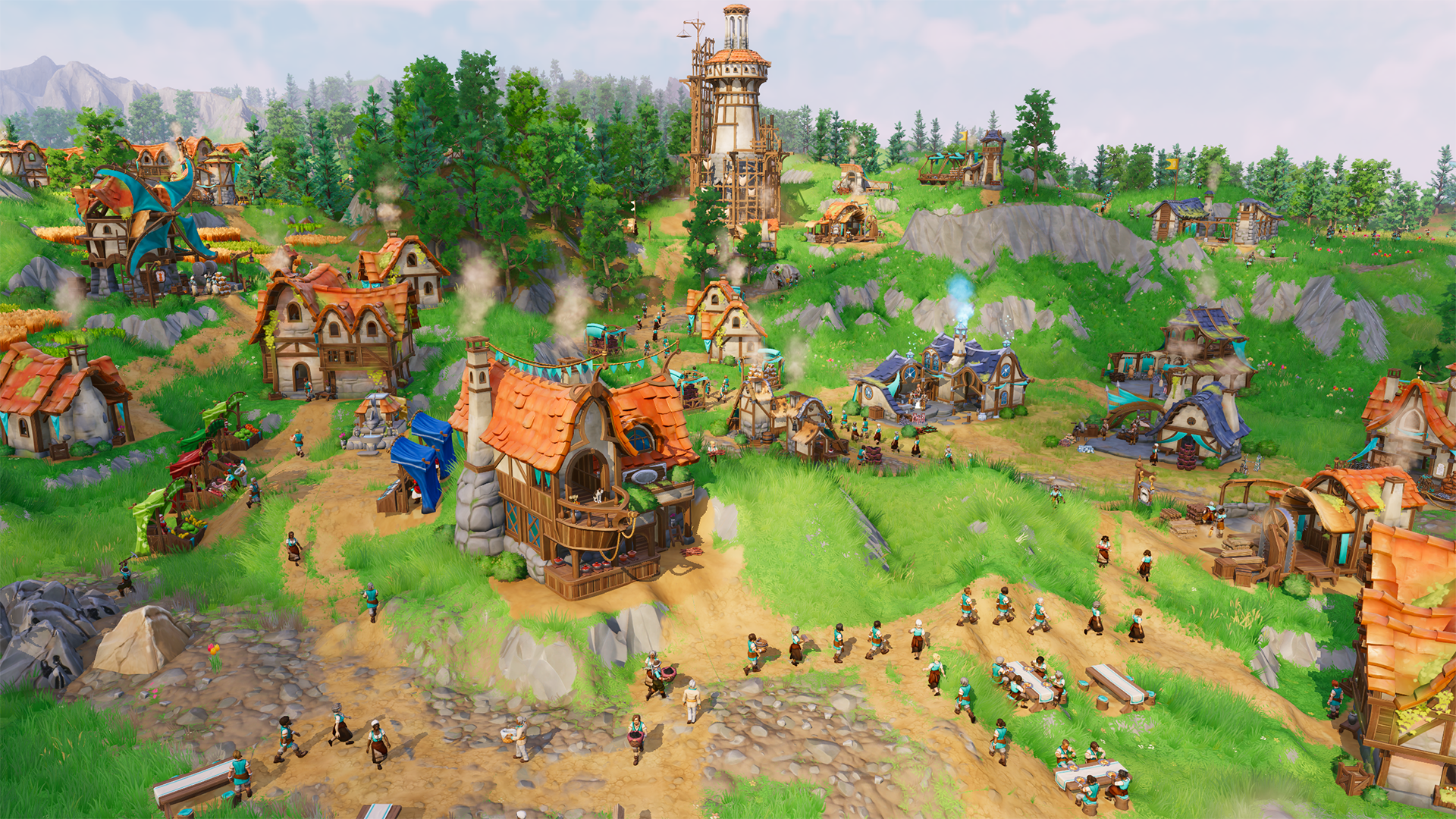
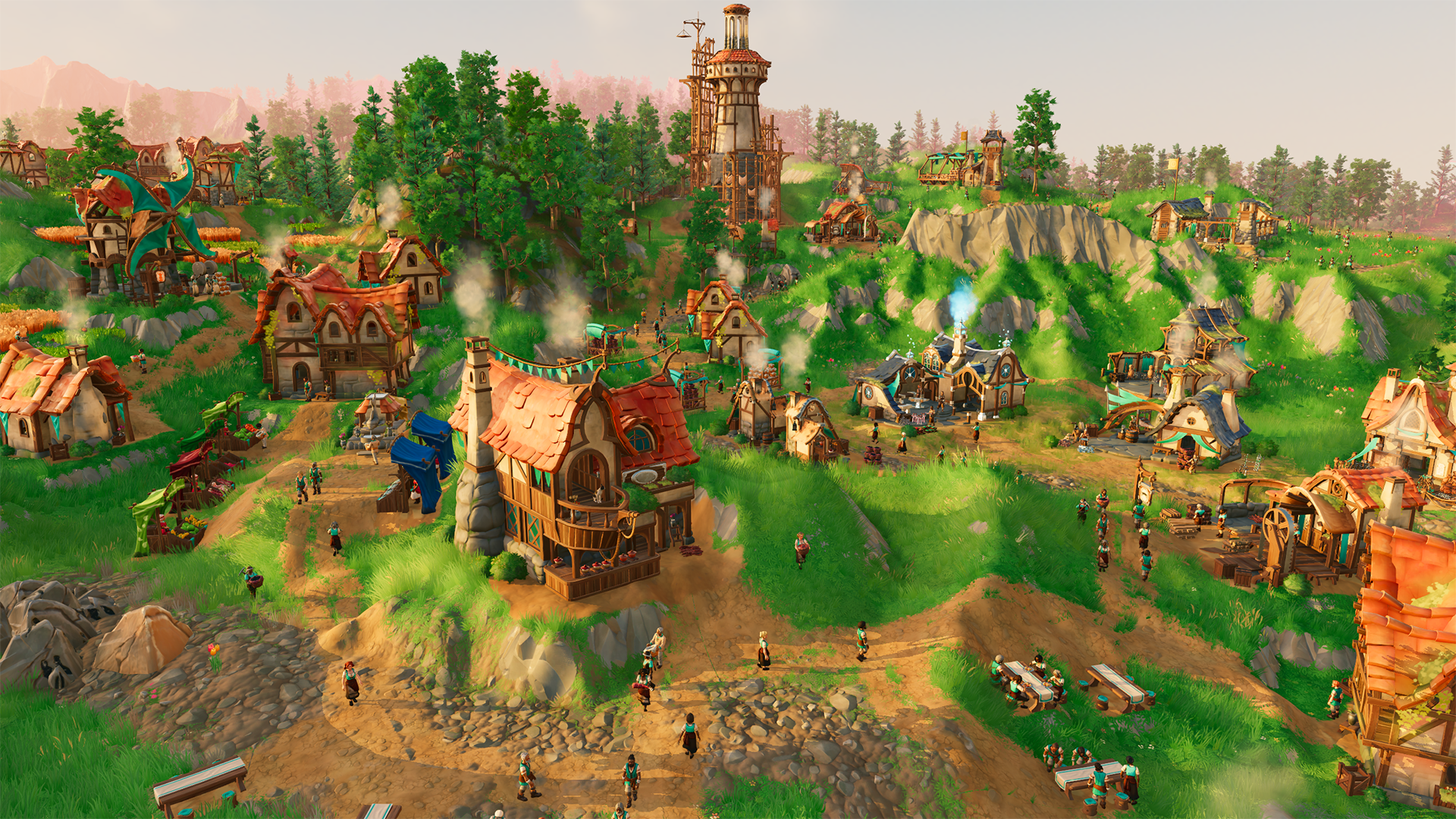
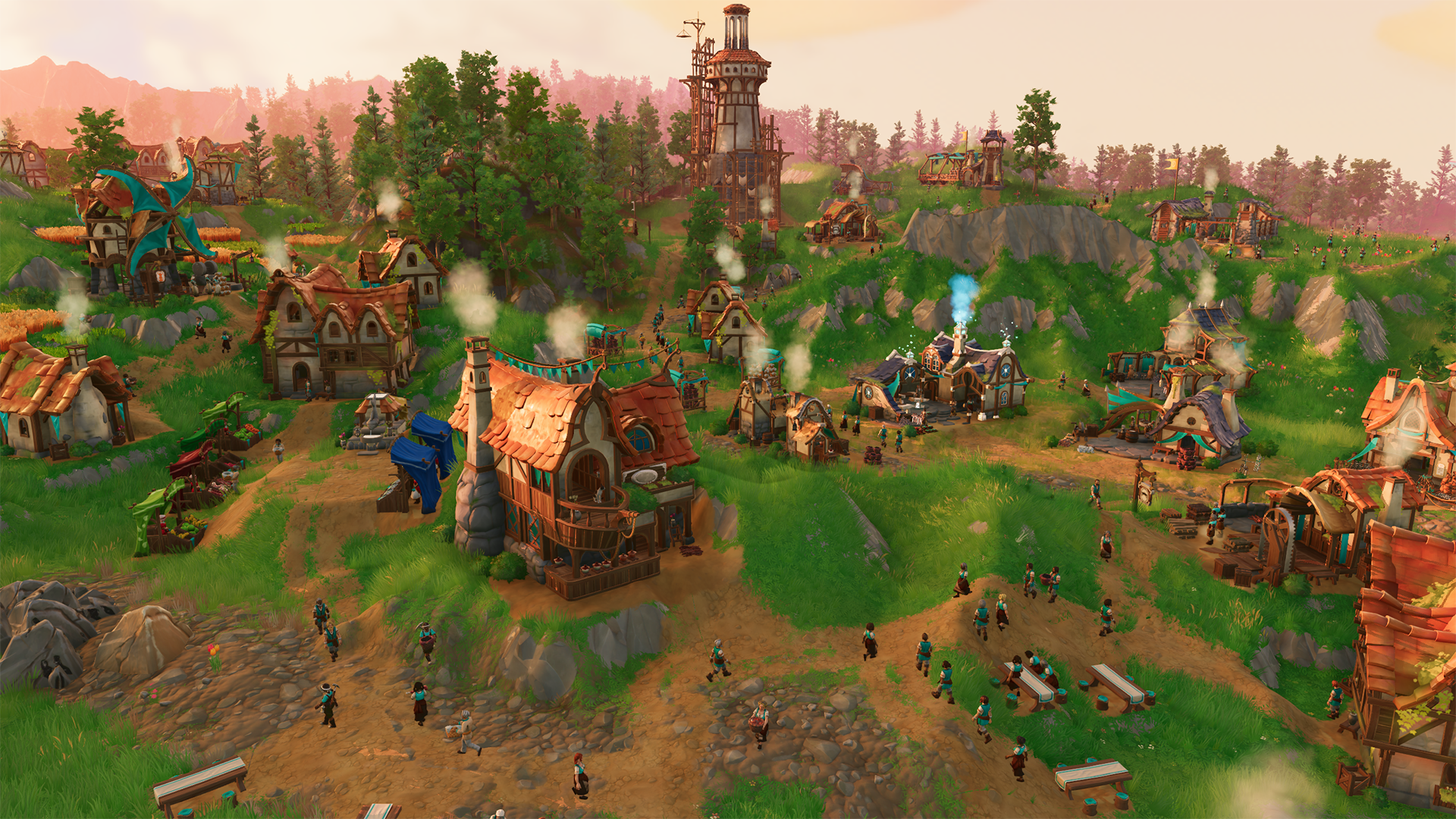
We saved the best for last: Let us introduce three brand new lighting setups to make Pagonia look stunning! (it looked stunning before, but this is a whole new vibe!)
By using a hotkey (default: CTRL+L) it’s possible to change the current map lighting setup at any time. We are soo happy with how they turned out, because each of them is looking gorgeous and sets an entirely different mood!
We can't wait for you to try the different lighting setups and let your villages shine! Please share your screenshots with us on Discord or in the Steam Community Hub, we would love to see them!
Sunrise
Cloudy Daytime (Default)
Golden Hour
Sunset
And this is not all, there are more features in the patch notes below! We hope you enjoy these improvements in your next game session.
Pick up the tools, Pioneers!Your Envision Entertainment Team
Patch Notes 0.6.0
Features
New Village State: Acquainted
The new state “Acquainted” is already achieved with 50% faction standing
The “Acquainted” state already unlocks some trade and gift offers
The overall amount of trade and gift offers has been increased
Building Construction Mode: New Help Grid
In building construction mode, a help grid will now also inform about space available around the current building position. This is very helpful to immediately recognize if there is enough room to build a road along or around the building. Beside that, it helps in general to estimate available space for other planned buildings nearby.
Building Construction Mode: Snapping to Road
In building construction mode, hovering over an existing road or very close to it will snap the entrance direction of the planned building to the road. This means it is still possible to place buildings sideways to roads, but also to snap them to the road directly without the need to rotate the building.
Road Construction Mode: 90 Degree Snapping
In road construction mode, new planned roads will snap automatically to 90 and 180 degree angles if the current mouse position is close to those axes. The new planned road segment will snap to existing road segments, previous planned road segments and to existing buildings/construction sites.
Road snapping can be enabled and disabled with a new button in the road construction menu
Road snapping can be suppressed by holding CTRL (customizable)
Efficiency statistics: Individual building efficiency display
For each building with a continuous workflow, an efficiency value is shown
Hovering over a building will show the efficiency value in the building tooltip
For a selected building, the efficiency value is displayed, too. The tooltip of the value will show the efficiency graph for the last hour. This is very helpful to understand whether the building is operating continuously or not, and at which efficiency level.
Efficiency values are displayed for the following buildings:
9 different gathering buildings (Woodcutter, Quarry, Copper hut, etc.)
16 different production buildings (Sawmill, Weaponsmith, etc.)
Both farm buildings, reflecting successful harvesting
The efficiency value reflects actual positive results, not if the units are continuously busy. The value of 100% is a best case value, it can be lower for many reasons, depending on the building type. Here are some examples:
Missing input commodities, missing food supply (for mining) or full output piles
Weaker ingredients which consume more production time (copper instead of iron)
Rotting plants (for farms: more seeding, less harvesting)
Economy enhancement: Commodity redirection by more flexible input piles
Equipment items in training buildings which are currently not needed for the ordered and scheduled units of that building, will be released and redirected to other locations if they are needed there. This ensures that equipment can be exchanged between e.g. multiple guild houses or multiple military academies to handle the training/recruitment orders.
Input commodities in buildings which are currently not needed because their recipe has been disabled, will be released and redirected to other locations if they are needed there.
Demolish refund and visualization
Demolishing a building grants 50% (rounded down) of wood/stone construction materials that were used to construct the building
Cloth and rope are refunded 100%
A tooltip shows the amount of commodities refunded
A simple demolish visualization has been added
The demolish refund can help to escape deadlock situations (no more softwood beams, no more stone deposits, no more nutrition food for quarries)
New additional lighting setups
For customized maps you can select between one of several new lighting setups. At the very end of the “Map Setup” section, you will find a new dropdown for “Atmosphere”
By pressing a hotkey (default: CTRL+L) it’s possible to change the current map lighting setup at any time. The last active lighting setup will be part of the savegame.
The 4 available lighting setups are:
Sunrise
Cloudy Daytime (Default)
Golden Hour
Sunset
New directional atmospheric fog
The fog color reacts when facing the sun
Can be deactivated in the settings
Improvements
Gameplay
When a hunter is selected, nearby animals get highlighted
Rations and nutrition meals now still look different after being served at mining buildings
Map Setups
The landing party “Beginner” now contains some trade carriers
Added enemy level “Extremely many” which adds another 50% of enemies
Added landing party “Beginner (Extended for co-op)”
This landing party has been created for co-op to allow a faster game start. It has both more units and more commodities. Adding more enemies keeps the overall challenge similar.
Visuals
Improved reflection on the cliff textures
Misc
Audio mixing
Saved games can be deleted from the load and save menus
Loading the game to the main menu with many saved games is now faster.
Switched trade UI layout for better readability so that the player is on left side and the NPC side is on right side
Improvements in the UI layout
Improvements of the localized texts
Improved rendering performance through optimized LOD levels for characters
Optimized VRAM usage with optimized texture compression setup
“Join Co-op game” button got a tooltip
Reworked visuals for the thieves
Improved rendering of distance fog
Performance improvements on maps with a lot of Pagonians
Fixes
Gameplay
Fixed: Sometimes the building state “Construction paused” was not removed even though the building got finished
Fixed: Sometimes a guard tower did not get any reinforcements
Fixed: When a soldier was living in a residence or cottage, its selection window did not reflect this
Fixed: A Pagonian bitten by a werewolf would still show “Ready for new orders” when selected
Fixed: A bitten Pagonian did not have an icon
Fixed: Building preview got stuck at its current location if cursor hovers any UI while holding right mouse button
Fixed: Fishers do not block traffic
Fixed: Storage pile not accepting commodities under some circumstances
Fixed issue where farmers would disregard work orders
Fixed issues where neutral village territories would prevent road accessibility for points of interest
Visuals
Fixed: Sometimes fish were swimming into the ground when close to the shore
Forester now carries different looking hardwood and softwood saplings
Fixed: State "not enough to do for all staff members at the moment" stayed active when building was turned off
The color of porcini and raspberries baskets was too similar, so the white blanket was removed from the porcini basket
Fixed: Black rabbits suddenly turned red when dead.
Misc
Fixed: When changing the language, not all text was updated to the new language
Fixed several crashes
Fixed: Placed pings in a co-op session persisted in the world after last client left the session
0.5.5 – Hotfix April 29
Fixed several crashes during map generation
Fixed shader regression on AMD cards
0.5.4. – Hotfix April 25
Fixed some desyncs
Fixed a regression that made the game crash on Proton/Linux/SteamDeck.
Note: We currently do not support the game on Linux on a general basis, and there is a known issue that the game does not run on newer nVidia hardware.
0.5.3 – Hotfix April 18
Fixed a crash that could occur during map generation when low on GPU memory
Fixed several rarely occurring crashes
Fixed multiplayer join when the map was not yet finished generating
Improved compatibility with Intel Arc
Fixed a rare desync bug that could occur during multiplayer sessions
0.5.2 – Hotfix April 17
Fixed a crash that could occur during map generation
Fixed several rarely occuring crashes
Improved diagnostic logs for some crash reasons
0.5.1 – Hotfix April 16
Bug Fixes
Fixed a desync bug that could occur during multiplayer sessions
Co-op Update 0.5.0 April 11
Major Content Update: Shared Co-op with up to 4 Players!
Dear Pioneers,
We are excited to announce the release of our next major content update: Shared Co-op is now available! Get ready to play Pioneers of Pagonia together with your friends! The last weeks working on this feature have been a lot of fun. If you are looking for groups to play together do not hesitate to join our Discord channel and connect with other players.
Catch a first glance at gameplay by watching this short clip of our devs playing a Co-op-Session. Even game devs are not safe from hungry werewolves. :D
What’s new?
Shared Co-op: Up to four Players!
Three Ways to team up!
Multiplayer Saves
New Interface Features
Improved Audio Mixing
Several Fixes
Find the full list of changes in the patch notes below.
Patch Notes 0.5.0
New Feature: Co-op Mode
Shared Co-op is our first multiplayer mode. It means that up to four players can play one faction together without limitations. Any team member may place buildings, paths, send commands or change settings at any time for that one faction.
To team up, there are 3 ways:
You can join a Steam friend currently playing Pioneers of Pagonia anytime, if that player has set their game to “open for friends” and not to “private”.
While you are running a game, you can also invite Steam friends to join your game via the Steam friend invite overlay.
You can also copy a game ID of your current match and share it with other people to allow them to join. This is helpful if you want someone to join who is not on your Steam friend-list or if you want to make sure that only specific players who received the code can enter. To that end, players who have your current game ID can join even if your game is set to “private”, so no random friends can join in who just happen to see you play in Steam.
Multiplayer saves:
Any player participating can save multiplayer games, any player participating can continue the saved games. Other players can join until the player limit, currently 4 players, is reached. While the player who sets up the map is defined as the host, anyone else can take over that role in a restart when loading a save game. They can also continue alone later if they want to, so savegames can be used both for single player and shared co-op gameplay.
Interface features:
You can see a list of all participating players and their connection quality.
Each player receives an individual player color, which is used to differentiate the players in the user interface. The color is visible on the player's name list for easy recognition.
You can see where other players currently plan to place a building with an outline of their player color.
You can see the camera position of other team members on the overview map in their player color.
You and your team members can “ping” locations in the world (even multiple ones at a time) to mark points of interest, and those are both shown on the overview map and the world view in the respective player color.
If one or more players select a building, this is also visualized in the game world view with an outline border of their player color.
Playing together:
The host can pause the game by entering the game menu (ESC key)
The host can change the game speed
If commands of team members conflict, they get automatically resolved. E.g. if one interaction turns another one invalid, e.g. because there is no longer enough room for a building, the first command stays valid.
The UI feedback (e.g. you see if another player currently selects a building, probably to change settings) helps to avoid simultaneous actions unless intended. But parallel actions are still allowed whenever possible, e.g. multiple players can adjust settings, in the same building simultaneously.
Improvements
Audio mixing
Better logging for specific classes of errors
Improved diagnostics for some crash types
Fixes
Fixed: When cycling through buildings with the TAB key, it no longer jumps to invalid positions
Fixed: Sometimes an error message was shown that a guildhall was missing even if there was one
Fixed: Some buildings were showing smoke during construction preview
Fixed: The enable guidance checkbox in the start new game flow was sometimes missing
Fixed: Fixed issues where POIs could not be reached with roads
Fixed: Fixed several crashes during map generation
Fixed: Fixed several minor issues to improve map generation
Fixed: Tavern tables no longer count as building for the Build Buildings objective
Fixed: Builders and diggers will now finish their current work step when the building is paused during construction before leaving the building
Fixed: Upon changing the language not all texts were updated to the new language until the game was restarted
Fixed: Changed display of meal quality statistics to better reflect actual data
Fixed: Boars' selection window now explains that they scare civilians
Fixed: Non-fighting units do no longer display their combat strength
Those are the patch notes up through May 14 for Pioneers of Pagonia
SANTA CRUZ, Calif. – In a rare move, Electronic Arts granted the media full access to the entire Madden25 development team for a whole day leading up to the game’s November release. This Hard Drive reporter was one of the few to step foot into the offices, speak with game developers, and investigate what it is that makes people hate these games so much.
After arriving at EA’s headquarters in Redwood City, we were shuttled one hour south to the Madden offices in a deluxe bungalow on a beach in Santa Cruz. At the door we were greeted by Tripp, a 22-year-old intern in a cutoff shirt.
“Welcome to casa de la Madden!” He said as bong smoke billowed out of the doorway, “Make yourselves at home, beers in the kitchen, the bros are out back by the pool, and stick around after hours for movie night on the flat screen, we got Fast Five on deck!”
Tripp pointed to an underlit living room with three couches and four TVs. The beach house, which appears to have been a place where video games were programmed many years ago, has devolved into a frat house that seemingly only throws LAN parties.
“It’s not being released until November, so we’ve still got a ton of time to get started,” Senior Gameplay Developer Scoot MacReady told us without making eye contact. “Aside from adjusting the rosters and thinking of a card tier higher than 99 OVR there’s not much else to it. Maybe something like Amethyst Black Diamond?”
During the “work day” we witnessed a 45 minute meeting on the game’s soundtrack and cover athlete, an optional brainstorming session on microtransactions, and a handful of entry level programmers copying and pasting the code from Madden 24, 23, and 21.
“The hardest part is convincing the US Federal Trade Commission that buying Fantasy Packs isn’t gambling for children,” said Executive Assistant Chad Thurman in response to highlighting the difficulties of making a new game every year. “Luckily EA has lawyers out the ass to make all those government dorks disappear.”
At press time, the launch date for Madden25 has been delayed to account for the boy’s summer trip to Tahoe.
We just updated the game with a quick hotfix. Make sure you have the latest version of the game 0.2.226d
List of fixes:
Q’ronar Shellback:
Fixed issues where his audio would keep looping in the background
Fixed missing Elite Kill audio cue when killing him
Reduced the width of the acid attack hitbox, it was a little larger than the visuals
Huuli Hoarder:
Fixed an animation glitch with the Huuli Hoarder where he would slide on the ground
Overclocks:
Fixed an issue where the Disposable Tech overclock stats were calculated as part of the Skill modifier group instead of the Overclock modifier group
Lighting:
Fixed an issue where the dwarf shadow would disappear when going behind the Drop Pod
Update 02 – Hoxxes Fights Back May 13
Hello Survivors,
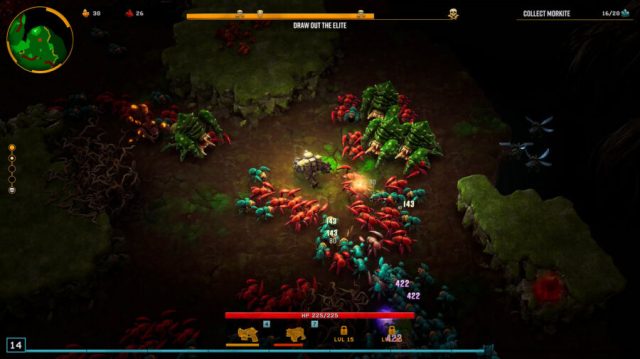
Welcome to the second content update for Deep Rock Galactic: Survivor. This update features several new enemies, new/revamped boss encounters, tons of new overclocks, and much more! If you want to play the update spoiler-free, you should just go ahead and close these update notes and fire up the game. We hope you enjoy it!
Features
New Boss Encounter: The Dreadnought Twins
There is now a chance that you will meet The Dreadnought Twins instead of the Dreadnought at the end of a dive. The twins consist of two smaller Glyphid Dreadnoughts: An Arbalest and a Lacerator. The Lacerator will charge you and deal damage in melee range. The Arbalest shoots deadly fireballs at you from range. In higher hazard levels these abilities become more and more intense. The twins have separate health bars and will heal each other if the difference in their remaining health becomes too large.
Reworked Dreadnought Encounter
In an effort to not make the old Dreadnought jealous of the newborn twins, we have given it some new abilities. You'll always be our special bug <3The first new ability is the Trembling Stomp which shoots out a tight cone of spikes that trap you until you dig through them. The second is the Swarm Bladder attack: A ranged projectile attack where the Dreadnought spits out a cocoon that bursts open and spawns a pack of Glyphids. Much like the twins, these abilities scale with hazard levels.
New Elite: Q’ronar Shellback
In Update 01 we added the Q'ronar Youngling and a mini-elite version of it. Now we have the Elite Q'ronar Shellback ready, and it's toxic as hell!Like its younger sibling, it can roll through rocks, but it has also evolved an Acid Spit attack that shoots a beam of acid towards you.The Q'ronar Shellback elite can be found on Hazard 2 and up, but only in Crystalline Caverns, Magma Core, and Salt Pits.
New Enemy: Huuli Hoarder
Get ready to hear the characteristic jingling of the clown car! The Huuli Hoarder has made its way into the game, and you don't want to miss this one. The Loot Crate it drops when you exterminate it can contain gold, nitra, weapon upgrades, and even rare artifacts.Finally an enemy that doesn't run towards you.
New Weapon Inspect screen
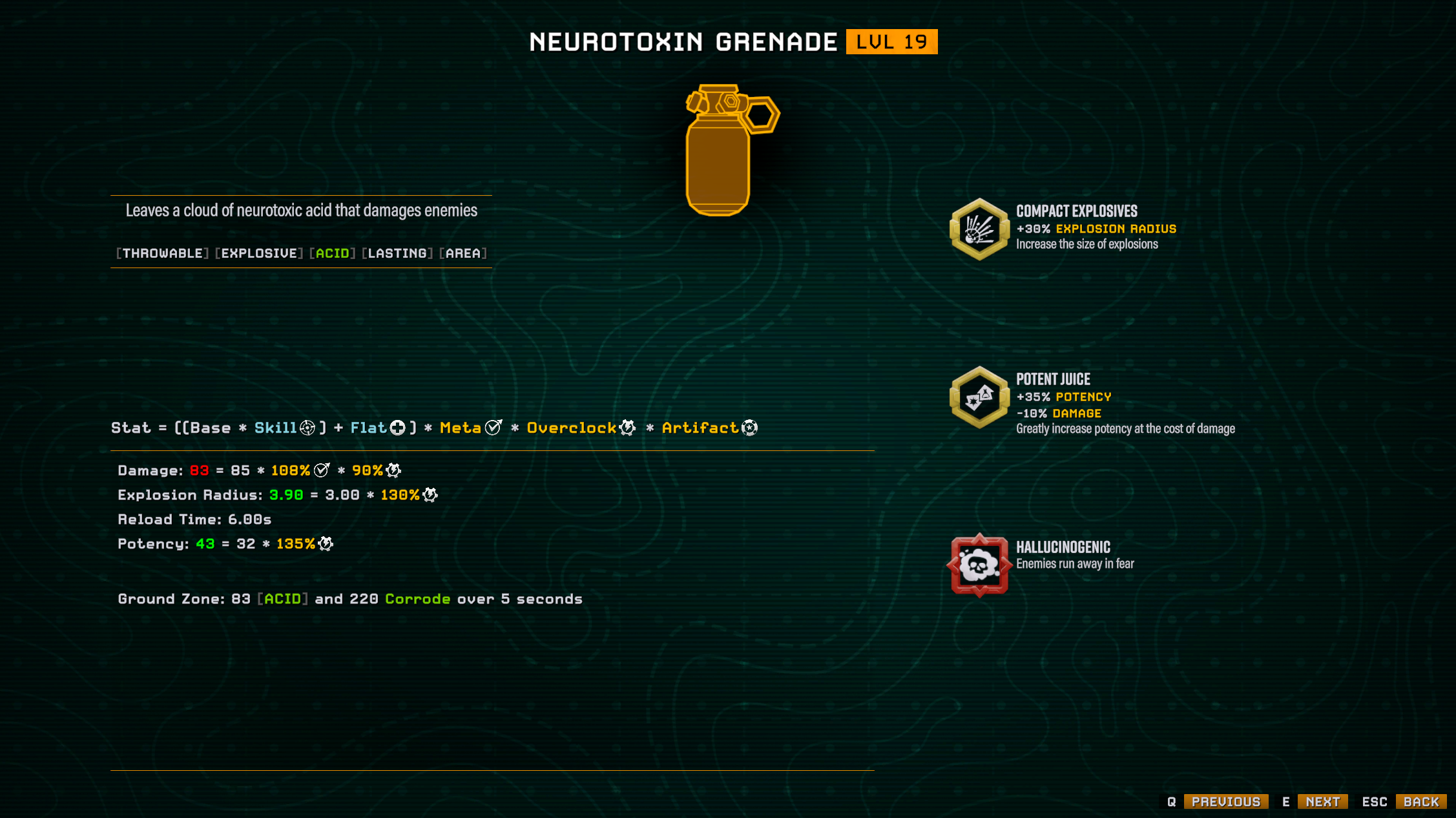
We have had a ton of requests for more information about damage calculations, so we have added a weapon inspection screen that can be accessed by pausing a run. On this screen, you can see how the weapon works, how the damage of the weapon is calculated, what the overclocks are doing, etc.
New Weapon Stats
We are introducing two new keywords in weapon descriptions: Pierce and Potency.
Pierce is now a stat on projectile weapons. Increasing the pierce stat will increase the amount of enemies that can be pierced by that weapon's projectiles.
Potency is a new stat that affects the amount of status effect stacks that is applied by a weapon (Fire, Electric, Cold, Acid). For example, if you want to increase your chance to freeze an enemy, you want to apply as many stacks of cold as possible, and increasing Potency is a great way to do that.
New Overclocks
We have added a bunch of new overclocks. Formatted here with the name and description of the overclock, and then a bullet point list of what weapons can receive the particular overclock.
Storm E-Mag
The last bullet in the clip fires in all directions.
DRAK-25 Plasma Carbine
"Thunderhead" Heavy Autocannon
"Stubby" Voltaic SMG
Knuckle Grip
Boomerang flies in an outward spiral before returning
Voltaic Stun Sweeper
Crisis Protocol
Drones rush to protect you when you take damage
Electrical Defense Drone
Cryo Defense Drone
Acid Viper Drone
Feedback Harness
Throws grenades when you take damage
Incendiary Grenade
High Explosive Grenade
Neurotoxin Grenade
The Favourite
You really like this one (different stat upgrades)
Cryo Grenade
"Hurricane" Guided Rocket System
Seismic Repulsor
LOK-1 Smart Rifle
Deepcore 40mm PGL
Plasma Burster
Omni Barrel
Fires in 8 directions
Zhukov
BRT7 Burst Fire Gun
Spliced Emitter
Increased beam length and duration
CRSPR Flamethrower
Cryo Cannon
Runic Warhead
Even bigger explosions
"Hurricane" Guided Rocket System
Potent Juice
Greatly increase potency at the cost of impact damage
Cryo Cannon
Neurotoxin Grenade
Impact Punch
Greatly increase impact damage at the cost of potency
"Stubby" Voltaic SMG
Unlimited Power
Splits into multiple beams
TH-0R Bug Taser
General Improvements
Worked with the transparency of the stats system, highlighting different stat modifier groups with different colors
Added a stage and hazard level widget, so it is now visible at all times during a run
Added more tooltips
TH-0R Bug Taser got a rework and is now a lot cooler
Plasma projectiles works with the piercing stat
Worked on a bunch of explosion and ground zone VFX to reduce screen clutter and improve visibility of other gameplay elements
Added a retry button to the end screen if the mission failed
Equipped Overclocks can now be viewed on pause and weapon inspect screens
Balance
We have fixed a long standing issue where enemies that were under the effect of knockback would take double damage from most sources.
Rebalanced weapons with knockback to account for the knockback fix
Fire, Electrical and Acid weapon tag upgrades now apply extra stacks
LOK-1 locks on way faster, has knockback and improved fire rate, damage and reload speed
LMG Gun Platform now has a clip size of 20 and an internal reload speed of 0.5 sec
Decreased the corrosion spread effect radius from 2 to 1
OC Drone Mining Damage: Increased mining damage from 10 to 15
OC Lead Wrapped Ammo: Reduces fire rate and reload speed by 20%
OC The Favourite: Now modifies both reload speed and fire rate
OC Cluster Grenade: Now also affects potency if the weapon applies status effects
OC Drone Mining Damage: Increased the amount of damage done from 10 to 15
Reduced the HP of regenerating vines in Hollow Bough significantly
Changed the way cold damage can freeze enemies. This results in a slight nerf for fast firing cold weapons, while retaining the awesome freezing power of high potency cold weapons
Rebalanced the number of Cryo status effects a weapons applies to make the new freeze status feel cool
Bug Fixes
Fixed an issue where the player could re-enter the drop pod just after arriving
Fixed a bunch of weapons showing too few stats on the pause screen
Fixed an issue where Spitball Infector would shoot once when spawning even from outside the screen
Fixed an issue where loot bugs would absorb all projectiles
Fixed a rare issue where first-time players would not be able to choose a class mod, and had to manually delete their save to continue
Plasma Burster: Fixed Explosion VFX was not affected by explosion range upgrades (visuals only)
Experimental Plasma Charger: Fixed an issue where the projectile would not pierce through big swarms.
Armskore Coilgun: Fixed Beam angle calculation so when using multiple beams, is now properly centered around the target
Shredder Swarm Grenade: Fixed several performance issues with this weapon.
OC Conduit: Fixed several performance issues with this overclock. We now limit how often the lightning explosion VFX can appear when hitting friendly targets, but the damage logic still executes as often as before
OC Conduit: Fixed an issue that could actually cause a game freeze. FPS drops might still occur, but the game should recover. This was especially prevalent when used in combination with Shredder Swarm
OC Drone Mining Damage: Fixed an issue where it would not show up in the UI and could be equipped more than once
OC True TNT: Fixed an issue where grenades with mining damage would do very little mining damage
Audio: Fixed very loud Vine destruction sound when drop pod lands on a whole bunch of them
Audio: Fixed the wrong pickaxe sound playing when mining certain minerals
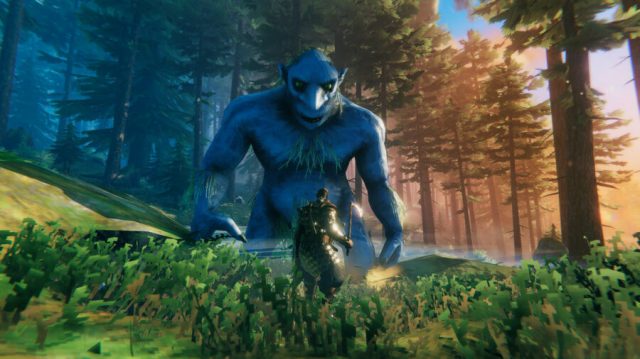
The world is heating up and in the south something is stirring... The creatures of the Ashlands come to life as the biome update is here at last!
After three weeks in the Public Test Branch, we believe we have ironed out most of the wrinkles with the update already, but please keep in mind that hotfixes and such are still likely to happen within the near future! Feedback and bugs are best sent in via the support page on our website.
Before you dive into the game, please do take a look at our preparation guide. This guide touches important matters such as world generation and mods.
You will find the abbreviated patch notes further down, and the detailed patch notes (full of spoilers) below those. Please respect those who don't want to see spoilers before they play.
If you have missed out on our gameplay trailer, it's available on our YouTube channel, but right now we want to get your blood pumping with this animated release trailer!
Abbreviated Patch Notes:
New content:
New Biome – Ashlands:
30+ New weapons
New bombs and ammunitions
3 New armour sets
2 New capes
10+ New creatures
70+ New buildable items
5 New crafting station upgrades
30+ New crafting materials
15+ New food items and potions
New locations
New music
New events
New mechanics
Fixes & Improvements:
Fixed Mead materials
Standardised texts throughout the game
Various fixes and improvements
Detailed Patch Notes:
New content:
Mechanics:
Beware the skies! Cinders rain down from above in the Ashlands, causing damage to those who are unprotected
Wooden build pieces can now catch fire in the Ashlands – and the fire spreads!
A new world modifier that allows fire to spread outside of the Ashlands as well (part of the immersive preset)
Deadly lava takes up large parts of the landscape; traverse it with your very own platforms
Lay claim to Charred Fortresses with two new Siege Machines
New plantable Ashvines will grow on the walls of your base
Combine your Flametal weapons with gems (Bloodstone, Iolite & Jade) in order to upgrade them to magical weapons (giving them blood, storm and nature based effects respectively)
The waters in and around the Ashlands are boiling hot, and only the sturdiest of ships can sail them
Terrain changes for Ashlands (Ashlands is now cut off from other biomes, only accessible by sea)
Fixes & Improvements:
Fixed Major Healing Mead material
Fixed Minor Eitr Mead Material
Standardised texts throughout the game
Updated names for old Flametal items
The popup for unlocking new things is displayed longer
Disabled ESRAM usage on Xbox One to work around a Unity bug that caused some particle systems to have corrupt shadowmaps
Added console command ‘findtp’ to go to nearest found item
Added console command ‘setfuel’ to fill all nearby lights to specified fuel
Map is now closed after using debugmode teleport
There is now a toggle in Gamplay Settings for “Attack towards look direction”, if this is toggled off, attacks will instead be made in the direction the camera is facing
Modding: IMonoUpdater no longer requires to be inherited from and error messages removed
Once more, please do remember to check out the preparation guide before you set sail towards the Ashlands, it contains important information!
NOTE! Unfortunately there are currently some issues with the Microsoft and Xbox versions of Valheim, which means there will be a slight delay in getting the update properly uploaded there. However, the current version on Xbox Flight is the same as the version coming to live, so crossplay will still be possible between Xbox Flight and Default Steam games.
Those are the patch notes on May 14 for Valheim Ashlands.
A compilation of the patch notes up through May 14 for Chrono Ark, in descending order, from latestto oldest:
UPDATED May 14
Chrono Ark 1.0.16 bug fix May 14
Lucy Skin- Bug Fixed that couldn't buy 'cat costumes'
Some minor bug fixed
Chrono Ark 1.0.14 Bug Fix May 7
Helia (Fire Arrow): Fixed an issue where the game would freeze if there were no skills in the deck.
DLC Special Ticket: Modified so that if no item is obtained upon use, gold is refunded.
Campfire Recruitment: Fixed an issue where the skin could not be changed in the campfire character recruitment UI when using a gamepad.
Adjusted to create backup saves more frequently.
Fixed a bug where new players could not use the gamepad in certain conditions upon entering combat.
Chrono Ark 1.0.12 May 5
Dark Heal: Fixed an issue where this skill would damage allies if used while under an attack power increase buff.
Selena & Helia: Fixed a bug where they would suddenly die unexpectedly.
Sun Shard & Moon Shard: Fixed a bug where players could gain the effects without having both shards.
DLC: Fixed a bug where players could select student costumes without having completed the ending if they owned the DLC.
Chrono Ark 1.0.11 hotfix May 4
Fixed an issue where a black screen would appear when skipping the story in the game.
Fixed a bug where skin images would not display correctly under certain conditions.
Chrono Ark 1.0.10 hot fix May 4
Fixed an issue that a new player couldn't use the game pad.
When using the game pad, we have fixed the bugs and freeze that occur after several UI appeared.
Chrono Ark 1.0.7 Hotfix May 3
You can wear skin without achieving Friendship Level3
Fixed a phenomenon that shows a lot of cards with Solar Storm and Flame Arrow abnormally.
Chrono Ark 1.0.1 bug fix April 29
1.0.1
Fixed a bug where the game would freeze under certain conditions during phase 3 of the spoiler boss.
Fixed a bug where the controller was not working when entering combat.
Fixed a bug where the equipped gear would disappear when equipping new gear under specific conditions.
Fixed a bug where there was a long wait time immediately after entering phase 2 during the final boss fight in freemode.
Fixed some minor bugs.
1.0.2
Adjusted the Shiranui battle to add a 'key' as an additional drop reward.
Chrono Ark 1.0 April 26
Hello everyone. This is Hyung-Ju Lee, the director of Chrono Ark.Chrono Ark has been updated from Early Access to version 1.0!
Main Update Features
Added Ending
The split ending has been added.There is another path waiting for you in the main story.What end awaits Lucy and the Investigators?
New Boss ‘Shiranui’
A new boss 'Shiranui' has been added.This boss requires you to defeat the Forgotten King at least 1 time to unlock. She is a boss that can replace Stage 2-1's Joker or Parade Tank.Like Sir Dorchi, this boss requires you to visit a specific event object to encounter.She is a challenging boss, so make sure you're well-prepared!
New Event Object ‘Popcorn Stand’
By visiting the Stage 2-1 random event 'Popcorn Stand', you can meet the new Popcorn Girl!
Changelog
Added 7 new Records
When turning on 'No place for nerds' option, the standing CG for dialogue will also be replaced.
Added a new option that reverts the battle BGM of a specific boss (vocals soundtrack) to the previous version.
Added 'Colorblind Mode' to make it easier to discern which skills have Swiftness.
Sizz - Added VFX for 'Incise'.
Huz - Added VFX for 'Crack!'.
Challenges - Removed 'Heals are Attacks, Attacks are Heals' Challenge. Added 'All Random' Challenge.
Added Gamepad Option - To use Gamepad, you now need to turn on the Gamepad option in the Options menu. This was added because certain non-Gamepad users were softlocked due to the game registering Gamepad inputs for an unknown reason.
[Japanese]
Greatly improved story text.
Shoutouts for yukinofu for proofreading!
Balance
Equipment
Crown of Thorns
Healing Power 15% -> 20%
Maximum Health 0 -> 5
Faint Resist 22% -> 40%
Light Priest's Clothing
Removed.
Relics
Fresh Milk
Reworked effect.
Azar : Reduced damage of Ultimate Blade Starfall.
Program Master : Now uses a special attack once when health is reduced by a certain amount. (Free Mode only)
Characters
Pharos Leader
Complete Obedience debuff : Added Evade -300%.
Huz
Unlock condition reduced from 7000 Gold to 5000 Gold.
Pressel
Guardian Angel
Reworked effect.
Charon
Soul Stigma
Reworked effect.
Silverstein
Overcharged Shot
Upon cast, the stored damage is now halved instead of reset.
Huz
Restrained Healing - Removed.
Pain Equals Happiness! - Added Swiftness
Lucy
Rampage - Cost 2->3
Bugfixes
Johan Lightning Shot - Fixed an issue where the displayed damage was different from the actual damage.
Fixed an issue where casting VFX skills on multiple enemies would result in multiple character sprites appearing.
Fixed an issue where enemies were rarely displayed as white images.
Fixed an issue where you could see dead enemies' skills in the Casting List.
Fixed an issue where 'instakill' skills could kill Trial enemies.
Fixed an issue where Sun Shard, Moon shard's effect text was displayed wrong.
Fixed an issue where Bomber Clown's unlock UI had no text.
Fixed an issue where the main menu's camera would sometimes go up.
The store page for the 'Summer Twilight' DLC is now open! It will be out along with May 3rd's Official Release.Add it to your wishlist if you want to receive a notification on its release!
Here's what's included in Summer Twilight!
Those are the patch notes through May 14 for Chrono Ark.
Wordle can be an unforgiving puzzle sometimes, and you can often come so close to ending a long winning streak. So, for your convenience, here are some hintsas well as the answerfor the Wordle today May 14.
We present Wordle clues here in a variety of ways to gently help you along, but if you just want the answer straight, spoilers be damned, then scroll all the way down to the section titled Today’s Wordle Answer.
A verb that means to gather together or accumulate a large amount or number of something, often over a period of time. It is typically used to describe the process of collecting things such as wealth, resources, information, or other items.
Wordle Hint Today Fifth Letter
The fifth letter for the Wordle answer today is:
“S”
Wordle Hint Today Fourth Letter
The fourth letter for the Wordle answer today is:
“S”
Wordle Hint Today Third Letter
The third letter for the Wordle answer today is:
“A”
Wordle Hint Today Second Letter
The second letter for the Wordle answer today is:
“M”
Wordle Hint Today First Letter
The first letter for the Wordle answer today is:
“A”
Today’s Wordle Answer
And finally, here is the Wordle answer today. While this is your last chance to turn back, don’t feel bad about having to look it up.
Sometimes you have just one last chance to solve the puzzle, but three different letters that could viably fit into that last remaining square. At other times the word is so obscure, you just would not have gotten it without having in-depth knowledge about some oddly specific subject.
That’s no reason to lose a streak you have kept going for 974 days straight! So here goes nothing:
3…
2…
1…
The Wordle answer today is “AMASS”
Previous Wordle Answers With Their Definitions
Wordle #1059 For May 13, 2024
“CUMIN“
A spice in many cuisines around the world, particularly in Indian, Middle Eastern, and Mexican dishes. The seeds have a warm, earthy flavor with a slightly bitter undertone.
Wordle #1058 For May 12, 2024
“OUTER“
An adjective to describe something that is situated on the exterior or outside part of something else.
Wordle #1057 For May 11, 2024
“TIDAL“
Refers to the periodic rise and fall of sea levels caused by gravitational forces exerted by the moon and the sun on the Earth’s oceans.
Wordle #1056 For May 10, 2024
“MEDIA“
Various means of communication that reach or influence people widely. It encompasses different forms of mass communication, including newspapers, magazines, television, radio, the internet, and social platforms.
Wordle #1055 For May 9, 2024
“JERKY“
A type of dried meat that has been preserved through a process of dehydration. It is typically made from lean cuts of meat such as beef, pork, or turkey, which are sliced into thin strips and then dried to remove moisture.
Wordle #1054 For May 8, 2024
“PIOUS“
An adjective that describes someone who is deeply religious or devoutly observant of religious principles and practices. It typically conveys a sense of sincere reverence, devotion, and obedience to religious beliefs, rituals, and moral teachings.
Wordle #1053 For May 7, 2024
“MUSTY“
An adjective that describes something as having a stale, moldy, or damp odor. It often refers to a characteristic smell that arises from lack of ventilation, moisture, or the presence of mold or mildew.
Wordle #1052 For May 6, 2024
“SHAVE“
A verb that means to remove hair from the body, typically using a razor or similar tool.
Wordle #1051 For May 5, 2024
“DECAL“
A design or image, often decorative or informative, that is transferred onto a surface; typically made from paper, vinyl, or another material with an adhesive backing, to be applied to various surfaces such as walls, windows, vehicles, or objects like laptops and water bottles.
Wordle #1050 For May 4, 2024
“VALUE“
The worth, importance, or significance of something. This can include tangible things like objects, goods, or services, as well as intangible things like ideas, beliefs, or principles.
Wordle #1049 For May 3, 2024
“EBONY“
A dense black hardwood, native to South Asia. It is known for its deep, rich black color and smooth texture, making it highly valued for woodworking and decorative purposes.
Wordle #1048 For May 2, 2024
“SLICE“
As a noun: refers to a thin, flat piece or portion of something, especially food.
As a verb: to cut something into thin, flat pieces using a knife or other cutting tool.
Wordle #1047 For May 1, 2024
“DIARY“
A personal record or journal in which an individual regularly writes down their thoughts, experiences, feelings, and reflections. It serves as a private space for self-expression and introspection.
Peacock has announced today that they are producing and canceling a new sitcom from the makers of “How I Met Your Mother.”
“NBC has spent years trying to find the ‘next big thing,’” explained NBCU President Lisa Katz. “We want something intelligent but accessible. Event programming that will bring in viewers night after night. We believe this can be that show and we will not be renewing it for another season.”
“This is the culmination of a long process for us, and we’re all very excited about it,” Katz continued. “Our development team spent years looking for a good multicam family sitcom that we can cancel.”
It’s been a big month for the bird app that’s not “the bird app” (which also isn’t the bird app anymore). Unfortunately, not all of Peacock’s audience are as excited about the news. In fact, some viewers say they actually want to see the shows that NBC produces.
“I was really looking forward to seeing that new Brett Butler show last year,” said Peacock subscriber Shirley Lennon. “It had a really great intro, but they canceled it before the first act started.”
Reports confirmed this process is not unusual for the streaming platform, which canceled Pete Davidson’s show ‘Bupkis‘ halfway through announcing it had been renewed for a second season. In fact, the network has been canceling shows at a record pace, and NBC executives are very excited about it.
Katz says the reason for all of these cancellations is low viewership, which they court by burying the shows on the seventh most popular streaming app.
“We want to make programming for viewers who love traditional television, but we don’t want them to know how to find it,” Katz explained. “That’s our goal, and I think we’re doing a great job.”
At the time of publishing, NBC said they had no plans to change their approach and also ‘Vampire Academy’ has been canceled.